
QuillBot is good at the least glamorous part of writing: the sentence that is technically fine but still sounds awkward. It is much less useful when people expect it to supply the idea, verify the claim, or magically make borrowed language original.
I tested it as an editing bench—not an AI content factory. That framing changed my verdict. The Paraphraser can remove friction, the Grammar Checker catches ordinary problems, and the Summarizer is useful for orientation. But the closer a sentence gets to nuance, argument, or voice, the less willing I am to let a mode name make the decision for me.
I gave QuillBot one deliberately bad paragraph
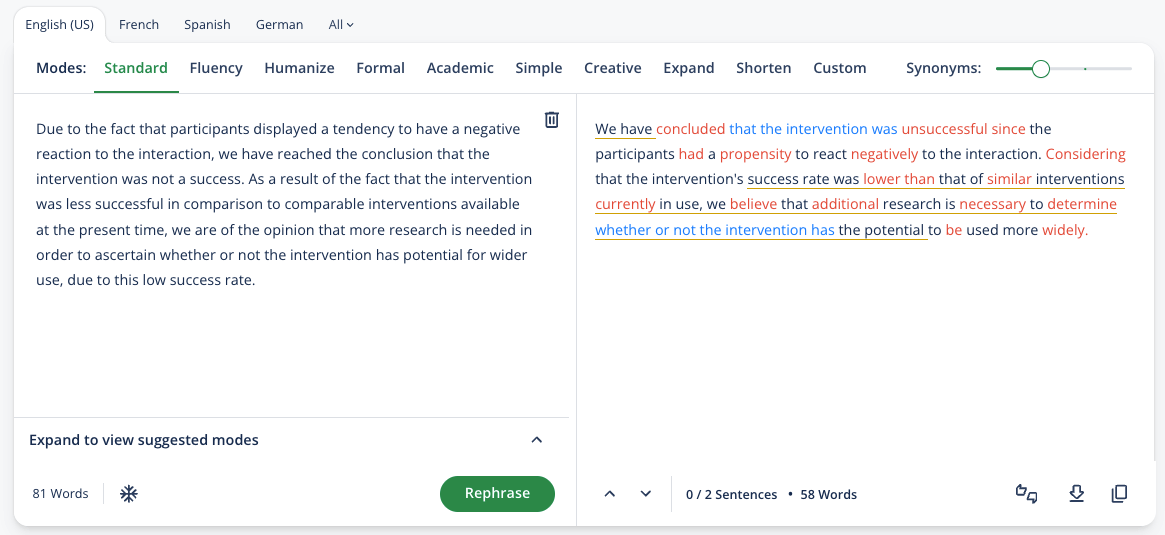
My test paragraph had three common problems: an overlong first sentence, a repeated phrase, and one qualification that mattered to the meaning. It was not nonsense. That distinction is important because a rewriting tool can make nonsense sound authoritative without making it true.
I ran the same passage through Standard, Fluency, and a more aggressive mode. Standard produced the safest structural improvement. Fluency made the rhythm smoother but flattened part of the writer’s personality. The aggressive version was the most impressive at first glance—and the one I trusted least, because it quietly made the qualification sound more certain.
This is why I do not treat QuillBot as the final writing stage in a repurposing system. When a transcript becomes a newsletter or article, I want the source claim visible. In my podcast content repurposing workflow, one clean recording remains the source of truth. QuillBot can improve a sentence from that workflow; it should not invent what the speaker meant.
What each QuillBot tool is actually good for
The free plan is more useful than its 125-word limit suggests
QuillBot’s free Paraphraser accepts up to 125 words at a time, with Standard and Fluency modes and no daily limit on the number of free paraphrases. That sounds restrictive if you imagine pasting an entire article. For the way I recommend using the tool—one problematic paragraph at a time—it is often enough.
The limitation becomes annoying when you are revising a report, thesis chapter, or a batch of client copy. Premium removes the paraphrasing word cap, unlocks nine modes, adds Compare Modes, advanced writing suggestions, tone insights, and broader access to tools such as plagiarism checking and the AI Detector.
Premium also lists a 25,000-word monthly allowance for plagiarism checking. The Summarizer expands from 1,200 words on Free to 6,000 on Premium, while AI Detector scans move from up to 1,200 words and six daily scans to unlimited length and scans according to QuillBot’s current feature pages.
QuillBot is not a substitute for a content workflow
A creator can easily accumulate tools that each improve one line while nothing useful gets published. QuillBot belongs near the end of a workflow, after the idea, evidence, and structure are settled.
For spoken-content creators, Castmagic has the opposite shape: it starts from a full recording and generates many structured outputs. QuillBot starts from text you already have and helps revise it. My Castmagic vs Descript comparison is a better place to decide how the original transcript becomes a draft; QuillBot can polish selected passages after that decision.
The same distinction appears in my experiment turning one 20-minute video into 10 social media posts. The hard work was choosing platform-specific ideas and checking claims, not replacing words with synonyms. QuillBot could tighten a LinkedIn paragraph or caption, but it would not decide which post deserved to exist.
Can QuillBot make AI text sound human?
It can vary syntax, replace common phrases, and reduce some obvious repetition. That may make a passage less monotonous. It cannot supply lived experience, an opinion earned through testing, or accountability for a claim. Those are the things readers usually mean when they say writing feels human.
I am especially cautious about detector-driven editing. QuillBot offers an AI Detector and Humanizer, but no detector can establish authorship with certainty. Editing solely to chase a score encourages strange prose and creates a perverse target: looking statistically unlike AI rather than communicating well.
My rule: use QuillBot to find alternatives, never to outsource comprehension.
Who should pay for Premium?
I would upgrade if…
- You revise English prose every working day and the 125-word box breaks your concentration.
- You are a non-native writer who benefits from comparing tone and fluency options.
- You edit newsletters, scripts, reports, or client drafts in many short passes.
- You will actually use Compare Modes and advanced suggestions, not merely collect features.
I would stay free—or skip it—if…
- You only need to repair an occasional sentence.
- Your real bottleneck is research, original examples, or a coherent argument.
- You expect paraphrasing to make copied work ethical or original.
- You already write and edit inside a broader tool that solves the same small problems.
If your writing begins with a podcast or video, compare the broader options in my best AI podcast repurposing tools guide. If it begins with editing the original recording, the full Descript review covers a workflow QuillBot does not attempt.

My final verdict
QuillBot is a capable sentence-level assistant with an unusually usable free tier. Premium earns its price by removing workflow friction, not by transforming the nature of writing. The $19.95 monthly plan feels high for occasional cleanup; the $99.95 annual option is more reasonable for daily use, provided you are comfortable making a yearly commitment.
I would test it with five paragraphs from your real work. Keep every original beside the rewrite. Count how many suggestions you accept, how many change meaning, and whether the tool saves more time than the comparison creates. If the accepted edits noticeably improve clarity, Premium may be a quiet productivity win. If you keep repairing the repair, the free plan has already told you enough.
Frequently asked questions
Is QuillBot free?
Yes. The free Paraphraser allows up to 125 words at a time with Standard and Fluency modes, and QuillBot says there is no daily paraphrase limit.
How much is QuillBot Premium?
As checked August 24, 2026, QuillBot lists $19.95 monthly, $39.95 every three months, or $99.95 annually, equivalent to about $8.33 per month.
Is QuillBot Premium worth it?
Yes for frequent paragraph-level revision and non-native writers who use multiple modes. It is harder to justify for occasional grammar fixes or people expecting long-form research and original thinking.
Does QuillBot plagiarize?
A paraphraser can change wording without making someone else’s idea yours. Cite sources and follow academic or professional rules. Premium includes a plagiarism checker, but responsibility remains with the writer.
Can QuillBot beat AI detectors?
No tool can responsibly guarantee that. Detection scores are probabilistic and can be wrong. Edit for accuracy, specificity, voice, and reader value rather than detector evasion.
Features, limits, and pricing checked August 24, 2026 against QuillBot’s official Premium, upgrade, Paraphraser, and Help Center pages.