
Descript makes a bold promise: edit audio and video by editing text. After working through its core workflow—from transcription and transcript corrections to Studio Sound, Underlord, captions, and export—I think that promise is mostly real. But the speed advantage depends heavily on what you are editing.
Last updated: August 14, 2026 · Pricing and plan limits checked against Descript’s current documentation.
My rating: 4.0/5
Quick verdict
Descript is worth it for dialogue-heavy content. If you edit podcasts, interviews, tutorials, screen recordings, or talking-head YouTube videos, deleting a sentence from the transcript is usually much quicker than hunting for the same words on a traditional timeline.
It is less compelling for cinematic edits, precise motion graphics, advanced color work, or projects where every cut is driven by visuals rather than speech. I also would not buy it primarily for automatic short-form clipping: OpusClip is the more focused option for that job.
Best for: podcasters, interview channels, course creators, solo YouTubers, and small content teams.
Skip it if: you need a full professional NLE, mainly edit music videos or B-roll montages, or want unlimited AI processing at a predictable flat cost.
How I evaluated Descript
I used a roughly 20-minute, English-language talking-head video as the reference workflow. That is a fair test for Descript because the project contains the things its target users deal with every week: spoken narration, pauses, filler words, a few repeated lines, basic visual cleanup, captions, and potential moments for short clips.
I focused on seven practical questions:
- Does editing the transcript actually make rough cuts faster?
- How easy is it to correct the transcript without damaging the edit?
- Can Studio Sound improve ordinary creator audio without making it unnatural?
- Are Underlord’s suggestions useful or just another layer of AI buttons?
- Can I create a polished talking-head video without opening another editor?
- Is Create Clips a serious replacement for a dedicated clipping tool?
- Are the media-minute and AI-credit limits easy to budget?
These are editorial workflow ratings, not laboratory benchmarks. I am deliberately not publishing a made-up transcription accuracy percentage or claiming that Descript saved an exact number of hours. Accent, recording quality, speaker overlap, computer performance, and editing style can change the result substantially.
My Descript test results
| Area | Rating | My take |
|---|---|---|
| Text-based editing | 4.5/5 | The main reason to use Descript. Excellent for removing or rearranging spoken sections. |
| Transcription workflow | 4.0/5 | Fast to work with, but names, jargon, accents, and overlapping speech still deserve a review. |
| Studio Sound | 4.0/5 | Useful rescue tool for ordinary creator audio when applied with restraint. |
| Underlord and AI cleanup | 3.5/5 | Helpful for a first pass; suggestions still need human judgment and consume credits. |
| Captions and basic video | 4.0/5 | Enough for polished talking-head videos, tutorials, and social content. |
| Create Clips | 3.5/5 | Convenient inside an existing project, but less specialized than dedicated clip generators. |
| Pricing predictability | 3.0/5 | Plan allowances are clear; estimating repeated AI-credit usage is the harder part. |
What is Descript, exactly?
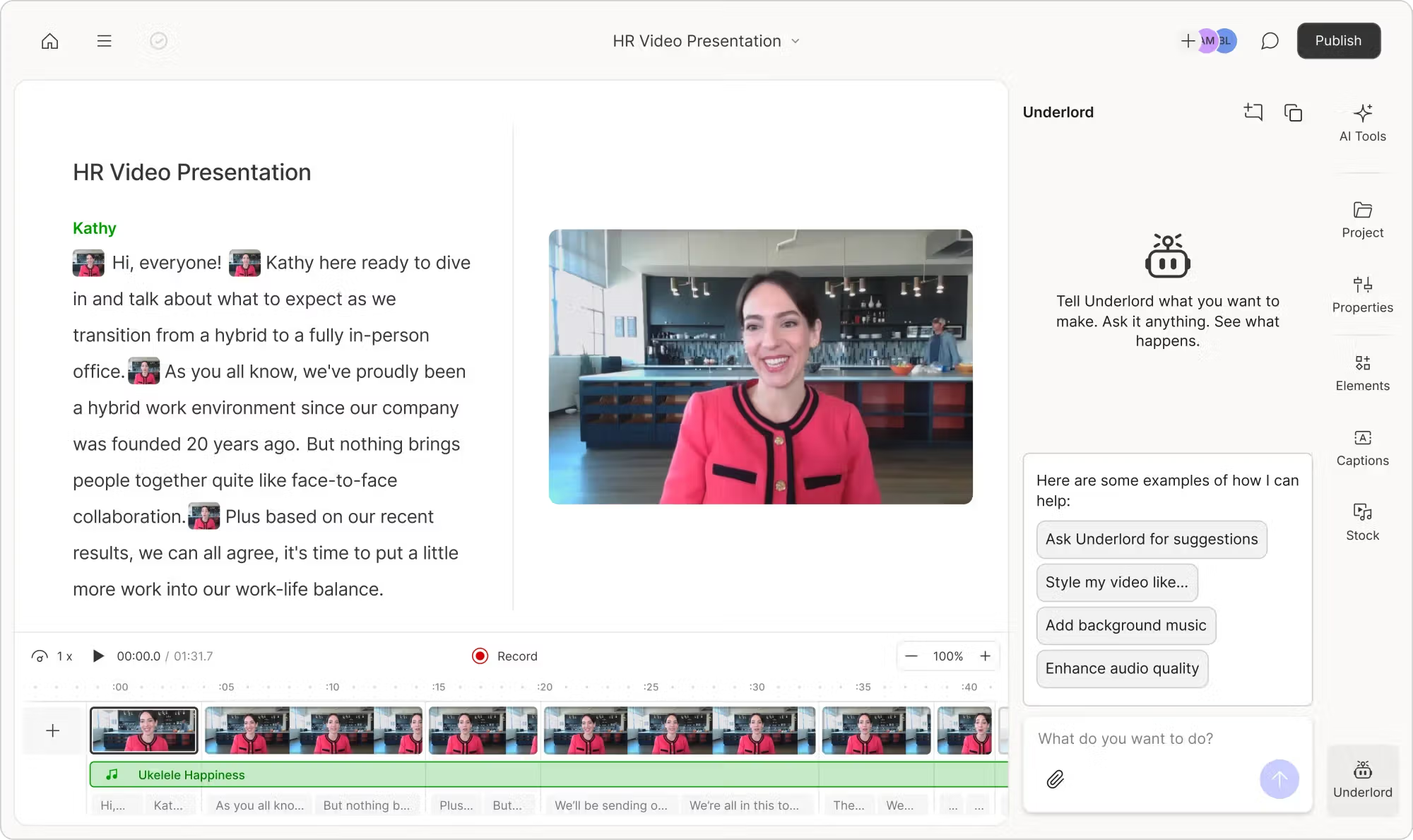
Descript is a desktop audio and video editor built around a transcript. Import or record a video, let Descript transcribe it, and the spoken words become an editable document. Delete text and the matching audio and video disappear. Move a paragraph and the media moves with it.
That sounds simple, but it changes the mental model of editing. In Premiere Pro or DaVinci Resolve, I think in clips, waveforms, tracks, and timecodes. In Descript, I can first think like a writer: Which sentence is repetitive? Which paragraph belongs earlier? Where does the explanation lose momentum?
Descript also includes screen recording, remote recording through Rooms, multitrack editing, captions, audio enhancement, filler-word removal, synthetic voice repair, eye-contact correction, backgrounds, and an AI assistant called Underlord. It is trying to cover the full production path for spoken content, not compete feature-for-feature with every professional editor.
Text-based editing is the feature that earns its place
The transcript is not a gimmick. For a rough cut, it is genuinely easier to skim paragraphs than scrub through 20 minutes of footage. I can remove an abandoned sentence, shorten an overexplained answer, or search for a phrase without repeatedly playing the timeline.
This is particularly good for podcasts and interviews, where the editorial decisions usually follow meaning. If a guest gives a strong answer in the wrong place, moving that section feels closer to rearranging a document than performing surgery on several tracks.
There is still a timeline underneath, and that matters. Text edits can create abrupt breaths, clipped consonants, or visually awkward jump cuts. Descript helps smooth gaps, but I still listen around every important cut. The transcript makes the first pass faster; it does not remove the need for a final quality-control pass.
Where text editing starts to feel limiting
If the spoken sentence is not the structure of the edit, Descript loses much of its advantage. A product montage, music-led travel video, cinematic sequence, or effect-heavy intro still calls for precise timeline work. You can make manual edits in Descript, but I would rather use an editor designed around detailed visual control.
Transcription is useful—but treat it as an edit layer, not a perfect record
Descript supports transcription in 25 languages, identifies multiple speakers, and can transcribe multitrack recordings. The practical benefit is not merely getting text from audio. The transcript controls the edit, powers captions, and gives the AI tools context.
Clear speech is the comfortable case. Proper nouns, company names, technical terms, heavy accents, crosstalk, and weak recordings are where I slow down and verify the text. A wrong word in a normal transcript is annoying; a wrong word in Descript can also affect a caption or an edit decision.
My habit is to correct recurring names early, label speakers, and review the transcript while listening at a faster playback speed. That gives the rest of the workflow a cleaner foundation.
Studio Sound: impressive cleanup, with one important caveat
Studio Sound is one of Descript’s easiest features to appreciate. It is designed to reduce background noise, echo, and other room problems while making speech sound more present. For a creator recording in a home office, it can make an ordinary microphone sound much more usable.
My preference is not to push it blindly. Aggressive enhancement can flatten room character or make certain syllables sound processed. I compare the original and enhanced audio on headphones, then use the least treatment that solves the problem. Good source audio still beats heavy repair.
Studio Sound and several other AI actions draw from the monthly AI-credit allowance. Before processing a long archive or a batch of episodes, test a representative section and check the Usage page. That reveals the cost of your real workflow better than any generic estimate.
Underlord is a capable assistant, not an automatic editor-in-chief
Underlord is Descript’s AI co-editor. It can help remove filler words, find retakes, tighten rambling sections, generate titles and descriptions, add chapters, create clips, and apply other edits through prompts or preset actions.
I like it most as a first-pass assistant. Finding repeated takes and highlighting potentially removable material reduces tedious scanning. What I do not do is accept every suggestion in bulk. A filler word can be meaningless, but it can also preserve natural rhythm or soften a statement. A pause can be dead air, or it can be the beat that makes a point land.
Remove Filler Words and Remove Retakes
These are practical tools for solo recordings. Remove Retakes is especially relevant when I restart a sentence several times and only want the final version. Filler-word cleanup works best when reviewed in context; stripping every “um” and “you know” can make a conversation sound unnaturally compressed.
Regenerate and AI speech
Descript can generate replacement speech from a custom voice, which is useful for correcting a small mistake without re-recording an entire section. I view it as a repair tool rather than permission to rewrite whole paragraphs. Disclosure and speaker consent matter, and a natural pickup recording is still preferable when it is practical.
Video editing and captions: enough for most talking-head projects
For a typical YouTube tutorial, interview, course lesson, product demo, or screen recording, Descript covers the essentials: scene layouts, B-roll, stock media, screen recordings, captions, aspect-ratio changes, basic transitions, backgrounds, eye-contact correction, and exports up to the resolution allowed by the plan.
Captions benefit directly from the corrected transcript. Styling them is straightforward, and the text remains tied to the spoken timing. This feels much more coherent than generating captions in a separate app and bringing them back into an editor.
The ceiling becomes obvious when I want detailed animation curves, sophisticated color grading, complex audio routing, a large plugin ecosystem, or frame-level compositing. Descript can finish a clean creator video; it is not pretending to be the ideal finishing suite for a commercial production.
Can Descript create good social clips?
Yes. Create Clips can identify moments, turn them into shorter compositions, reframe the video, and add captions. If I am already editing the full episode in Descript and only need a few promotional clips, keeping everything inside the same project is convenient.
However, automatic clipping is not Descript’s sharpest competitive edge. A dedicated tool such as OpusClip or Vizard is built around scoring moments, generating multiple vertical options, and processing long videos in batches. Descript makes more sense when the short clip is one output from a broader editing workflow.
If short-form repurposing is the main goal, see my hands-on OpusClip review, Vizard AI review, or the practical guide to turning a YouTube video into Shorts.
Performance and stability: test your real project before committing
Descript does a lot in one workspace, which also means performance depends on the project, source files, network, and computer. Current user feedback is polarized: many reviewers love the editing model, while others report freezing, recording problems, slow projects, or unreliable AI processing.
I would not turn scattered reviews into a universal verdict, and one test project cannot establish long-term reliability. The sensible approach is to use the free plan for a project that resembles your actual work—similar duration, camera resolution, speaker count, and number of tracks. If a weekly podcast depends on multitrack recordings, test that exact workflow rather than a five-minute sample.
For important recordings, I also keep an independent local backup. That is not a criticism unique to Descript; it is a basic rule for any recording platform.
Descript pricing in 2026
Descript now measures usage with two separate allowances: media hours for imported or recorded audio and video, and AI credits for AI-powered actions. Media allowances reset monthly and do not roll over. Purchased top-ups can remain available for up to one year.
| Plan | Price per person | Included usage | Best fit |
|---|---|---|---|
| Free | $0 | 1 media hour/month; 100 AI credits as a one-time allowance; 720p export | Testing the workflow |
| Hobbyist | $24 monthly or $16/month billed annually | 10 media hours/month; 400 AI credits; 1080p export | Light solo use |
| Creator | $35 monthly or $24/month billed annually | 30 media hours/month; 800 AI credits; 4K export; broader AI and stock tools | Regular creators and podcasters |
| Business | $65 monthly or $50/month billed annually | 40 media hours/month; 1,500 AI credits; Brand Studio, translation/dubbing, priority support | Teams and branded production |
| Enterprise | Custom | Custom limits, security, service, and support | Larger organizations |
Prices are in USD and were checked on August 14, 2026. Descript can change plan names, limits, and promotions, so confirm the latest details on the official pricing page before buying.
The hidden budgeting question is AI credits
The media-hour limit is fairly easy to understand: estimate how much material you import or record each month. AI credits are less intuitive because usage depends on which tools you run and how often you rerun them. Underlord, Studio Sound, Remove Filler Words, Green Screen, Eye Contact, and AI speech can all draw from the allowance.
Descript currently sells top-ups, including 350 credits for $35, 1,000 for $80, 3,000 for $180, and 8,000 for $400. Additional media is listed at $25 for 5 hours, $80 for 20 hours, and $150 for 50 hours. That safety valve is useful, but frequent top-ups can change the value calculation quickly.
Start with Free for interface fit, not for a full production month. If you publish occasionally, Hobbyist is reasonable. Creator is the practical tier for a weekly video or podcast workflow because its media allowance and 4K export leave more room. Upgrade for measured usage—not because the AI feature list looks exciting.
Is Descript better for podcasts or YouTube videos?
For podcasts: one of Descript’s strongest use cases
Podcast editing maps naturally to a transcript. Descript can record or import multiple speakers, label them, remove unwanted sections, clean the audio, generate show notes and chapters, and create a video version with captions. For an interview show, that is a coherent end-to-end workflow.
The main caveat is that audio specialists may want finer control than Studio Sound and Descript’s timeline provide. If the episode requires detailed mixing, restoration, or mastering, I would finish the audio in a dedicated DAW.
For talking-head YouTube: fast and pleasantly focused
Talking-head videos are the other obvious fit. I can cut repeated lines in the transcript, add screen recordings or B-roll, create styled captions, fix a small spoken mistake, and export without managing a complicated timeline. Educational channels and product-led content benefit more than highly cinematic channels.
If the finished recording also needs to become blog posts, newsletters, and social copy, Descript is not the only option. My Castmagic vs Descript comparison explains the difference: Descript is primarily where I edit the media, while Castmagic is stronger at turning the conversation into many written assets. If you are choosing a recording platform before editing, my Descript vs Riverside comparison explains how the Riverside remote recording workflow differs from Descript transcript-based editing. You can also read my Riverside review before deciding where to capture the conversation. You can also see the full workflow I use to turn one video into 10 social media posts.
Descript vs the main alternatives
| Tool | Choose it when… | Main trade-off |
|---|---|---|
| Descript | You edit dialogue-heavy audio and video and want transcript-based control. | Less depth for advanced visual editing; AI credits need monitoring. |
| Premiere Pro / DaVinci Resolve | You need precise professional editing, grading, effects, and audio control. | Higher learning curve and slower transcript-first rough cuts. |
| OpusClip | You want many automatically selected Shorts from long videos. | Not a full long-form editor. |
| Vizard | You want approachable browser-based clipping and repurposing. | Less control over full long-form production. |
| Castmagic | You want transcripts, articles, show notes, emails, and social copy from recordings. | It does not replace a video editor. |
| CapCut | You prioritize quick, visual social editing, effects, and templates. | The document-style long-form editing experience is weaker. |
What I like
- Transcript editing makes dialogue-heavy rough cuts intuitive
- Audio, video, captions, and AI tools live in one project
- Studio Sound can rescue ordinary creator recordings
- Very approachable for people intimidated by traditional timelines
- Strong fit for podcasts, interviews, courses, and talking-head videos
What I would change
- AI-credit consumption is harder to predict than media hours
- Not enough control for advanced editing and finishing
- Automated cleanup can make speech feel over-edited
- Long, complex projects deserve a stability test
- Dedicated clipping tools are better for high-volume Shorts
Is Descript worth it in 2026?
Yes—if most of your editing decisions begin with words. Descript reduces the friction between deciding what should change and making the cut. For a podcaster cleaning an interview or a YouTuber tightening a tutorial, that can matter more than having hundreds of advanced controls hidden in menus.
I would not describe it as a universal video editor. Its sweet spot is clearer and, honestly, more useful than that: it is a production workspace for spoken content. The more your project depends on dialogue, the more natural Descript feels. The more it depends on visual rhythm, layered effects, detailed sound design, or automatic high-volume clipping, the more likely I am to choose another tool.
My recommendation is to run one representative project on the free plan. Correct the transcript, make a rough cut, try Studio Sound on a short section, create captions, test one or two Underlord actions, and export. Then check both the result and the Usage page. If that workflow feels easier than your current editor and the credit usage fits your publishing schedule, the Creator plan is likely the best balance for regular production.
Frequently asked questions
Is Descript free?
Yes. The Free plan includes 1 media hour per month, a one-time allowance of 100 AI credits, and export up to 720p. It is enough to test text-based editing, but the limits are tight for ongoing production.
Is Descript good for podcast editing?
Yes. Podcasts are one of its best use cases because editing decisions usually follow the conversation. Multitrack transcription, speaker labels, filler-word and retake removal, Studio Sound, chapters, and show-note generation all fit a podcast workflow.
Is Descript a good video editor?
It is a good editor for talking-head videos, tutorials, interviews, screen recordings, and other speech-led content. It is not the best choice for complex effects, professional color grading, cinematic sequences, or detailed audio mixing.
Can Descript replace Premiere Pro?
For simple dialogue-heavy creator videos, it may replace most or all of the workflow. For advanced commercial editing, it cannot replace Premiere Pro or DaVinci Resolve. Some creators rough-cut in Descript and finish in a traditional editor.
Is Descript better than OpusClip?
They solve different problems. Descript is better for editing the full podcast or video through its transcript. OpusClip is better for automatically finding and producing many short vertical clips. Read the full Descript vs OpusClip comparison for the workflow differences.
Does Descript use AI credits?
Yes. AI tools such as Underlord, Studio Sound, filler-word removal, Green Screen, Eye Contact, and AI speech can consume credits. Paid plans include a monthly allowance, and additional credits are available as top-ups.
Continue reading
Castmagic vs DescriptWritten repurposing or media editing?
Best AI Clip Generator for BeginnersCompare easier tools for creating Shorts.
One Video Into 10 Social PostsMy complete OpusClip and Castmagic workflow.
Source note: Plan prices and allowances were checked against Descript Pricing. Usage rules were checked against Descript’s official guides to media minutes and AI credits and top-ups. Current user-review patterns were cross-checked on Capterra. Features and prices can change after publication.