
Riverside and Zencastr solve the same ugly remote-recording problem: you want a clean guest track even when the call itself is held together by mediocre Wi-Fi. But the old shorthand—“Riverside for video, Zencastr for audio”—is no longer accurate enough for a buying decision.
Zencastr’s current public feature table now includes 4K video, 48 kHz WAV, local multitrack recording, text-based editing, AI layouts, captions, hosting, and social publishing. Riverside still has the stronger producer-oriented studio and a more coherent video-production workflow. In other words, this is less a format comparison than a workflow comparison.
Choose Riverside if you are producing a video show, client interview, webinar, or multi-output production where studios, producer controls, publishing, and live video belong together. Choose Zencastr if you want unusually generous recording access, a simpler guest room, and AI post-production plus podcast hosting in the same product. For a serious show, I would test both with the same guest before committing.
Last fact-checked: August 17, 2026. Pricing and plan labels change frequently. Riverside’s public pricing page was checked for the Free, Pro, Grow, and Webinar tiers; Zencastr’s pricing page currently loads a JavaScript-driven table that labels its free column “Vibecastr,” so I avoid presenting an old paid-price list as current.
Riverside vs. Zencastr: the practical difference
Both platforms record locally instead of treating the internet call as the master file. Both now offer editing and AI assistance. The useful distinction is what each platform assumes you will do after the recording ends.
| What matters | Riverside | Zencastr |
|---|---|---|
| Product center | Remote studio, video production, editing, publishing, and live sessions | Remote recording plus AI post-production, hosting, analytics, and social output |
| Free entry shown publicly | $0; one-off 2 hours of multitrack recording, up to 720p, watermark, 44.1 kHz audio | Free column currently labelled “Vibecastr”; table lists up to 6 participants, 4K video, 48 kHz WAV, and unlimited separate-track recording |
| Separate tracks | Paid plans include monthly separate-track download allowances; recording itself is not the same as downloading every raw track | Public table lists unlimited separate audio/video recording and download in the free column |
| Editing style | Transcript editing, timeline/layout controls, Magic Audio, Magic Clips, AI repurposing | Chat-based Producer, transcript editing, filler and pause removal, AI layouts, captions, audio cleanup |
| Best fit | Video podcasts, webinars, client work, livestreams, and producer-led teams | Audio-first or lean video podcasts that value recording access and built-in post-production |
That table is why I would not choose by the first free trial alone. Zencastr looks remarkably strong if your only requirement is “record a remote conversation in high quality.” Riverside becomes more compelling when the recording is the first step in a managed content pipeline.
Recording quality: local capture is only half the story
Both companies use local recording, which means each participant’s microphone and camera are captured on their own device rather than compressed into the live call. This protects the final file from the guest’s unstable connection. It does not magically fix a cheap microphone, a loud room, or a laptop that runs out of storage halfway through the interview.
Riverside’s current product pages advertise up to 4K video, uncompressed 48 kHz WAV audio, separate tracks, continuous uploading, and synchronized files. Its Free plan is the rehearsal tier: the public comparison shows a one-off two hours of multitrack recording, up to 720p, 44.1 kHz audio, and a watermark. That is enough to test the guest flow, not enough to casually build a client archive around.
Zencastr is the surprising one here. Its current recording page says the free experience supports unlimited recording time, up to six participants, up to 4K video, and up to 48 kHz WAV and MP3 audio. The public pricing table also lists local recording, progressive uploads, automatic cloud backups, and unlimited separate-track recording in the free column. If Zencastr keeps those limits unchanged, it is a very difficult free offer to ignore.
For my full Riverside reliability and guest-experience assessment, see my Riverside review. If you are specifically deciding whether the free tier is enough, the more focused Riverside Free breakdown is the useful follow-up.
Editing and AI: which one actually reduces post-production?
Riverside is better when the episode has multiple destinations
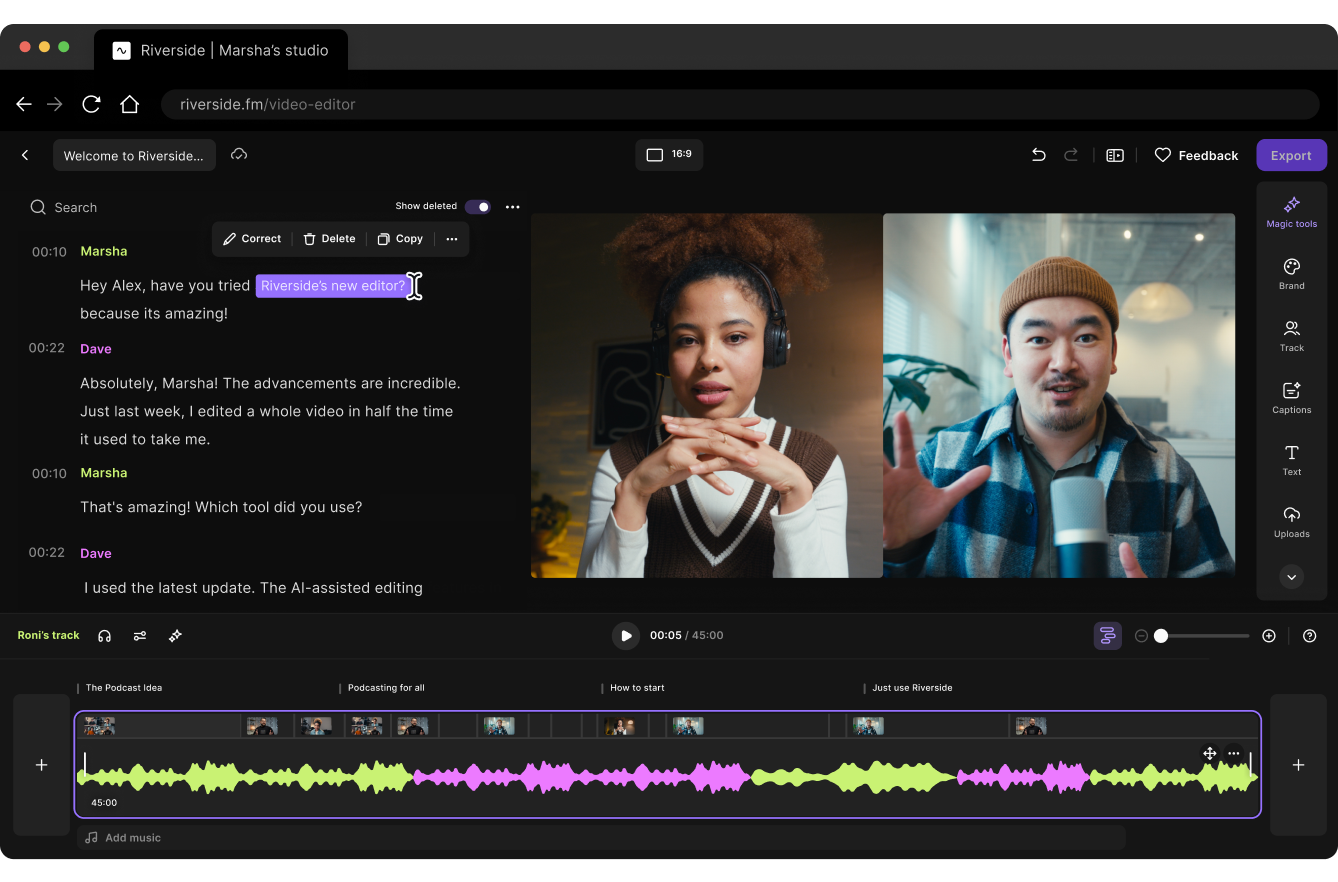
Riverside’s advantage is not that it has a transcript editor—Zencastr has one too. The advantage is that the transcript editor sits inside a broader production room. I can move from a recording to a layout, an audio cleanup pass, a Magic Clip, show notes, a podcast export, or a livestream without rebuilding the project somewhere else.
The current paid feature list includes unlimited text-based editing, an AI editing and repurposing agent, AI B-roll, eye-contact correction, silence and filler removal, unlimited transcriptions, Magic Clips, show notes, and audio enhancement. That is a strong bundle for a video podcast team that wants one person to record and another person to finish the episode.
Zencastr is better when you want to tell the editor what to do
Zencastr’s newer editing experience is more conversational. Its Producer lets me request changes in plain language, while the product handles transcript-based cuts, background-noise cleanup, level balancing, long-pause removal, filler-word removal, active-speaker layouts, and clips. That is appealing when the goal is “make this publishable” rather than “give me a detailed timeline for every editorial decision.”
I would still listen through the final mix. Removing every pause can make a thoughtful interview feel rushed, and filler-word detection can remove a word that carries emphasis. AI is useful for the first pass; it is not the person responsible for the guest’s meaning.
If transcript editing is the central craft rather than an add-on to recording, compare both with my Descript review. Descript remains the tool I would reach for when I need to rewrite a spoken argument carefully, not merely clean it up.
Hosting, publishing, and team operations
This is where the two products stop looking like simple recording apps.
Riverside’s Pro plan includes podcast hosting and analytics, plus publishing to YouTube, Spotify, Apple, Instagram, LinkedIn, and other destinations. Grow adds social scheduling, a newsletter, a creator website, hosting for two shows, video hosting, and 1080p multistreaming. Webinar adds registration, audience engagement, lead capture, and webinar analytics. Business is aimed at production teams that need workspaces, roles, collaborative editing, integrations, and support at scale.
Zencastr’s public table lists unlimited audio and video uploads and hosting in the free column, an embeddable player, advanced podcast analytics, five podcast shows, distribution to major podcast platforms, social publishing and scheduling, 1080p video streaming, and ad-campaign analytics. That makes Zencastr more than a recorder, especially for an independent podcast that wants the RSS and promotion layer close to the recording.
My practical distinction is this: Riverside organizes production; Zencastr organizes the podcast. If I were working with a producer, a guest manager, and a video editor, I would prefer Riverside’s studio model. If I were the person recording, cleaning, hosting, and distributing a small show myself, Zencastr’s wider free table would make a strong case.
Pricing: what the public pages actually support
Riverside is comparatively transparent. Its current page shows:
- Free: $0, one-off 2 hours of multitrack recording, up to 720p, watermark, and 44.1 kHz audio.
- Pro: $29/month monthly or $24/month when billed annually; up to 4K, 48 kHz audio, no watermark, 15 hours of separate-track downloads, and the main AI/editing features.
- Grow: $39/month monthly or $34/month annually; 20 hours of separate-track downloads, two studios, scheduling, newsletter and creator-site features, and live streaming.
- Webinar: $99/month monthly or $79/month annually; webinar registration, engagement, lead capture, and analytics.
- Business: custom pricing for larger production teams.
The important Riverside caveat is the difference between recording and separate-track downloads. The page says recording is unlimited on paid plans, but Pro, Grow, and Webinar have 15, 20, and 25 hours of separate-track download allowances respectively. If you record a lot but only export a mixed file, that may be fine. If you archive every guest track, budget around the download allowance.
Zencastr’s page is harder to quote responsibly. The current public table exposes a free “Vibecastr” column and an Enterprise custom column, but the standard paid pricing values were not rendered as a stable public text table when I checked it. I would not repeat the old “Standard is around $20” claim unless the price appears in your own checkout. See the live Zencastr pricing page immediately before subscribing.
For a plan-by-plan Riverside cost breakdown, use my Riverside pricing guide. It is more useful to calculate the number of episodes, raw-track downloads, and destinations you will use than to compare the headline monthly number.
What I would choose for four real shows
Video podcast with YouTube as the home base
Riverside. I would pay for the video quality, separate tracks, producer controls, layouts, and the handoff into clips and publishing. Zencastr can record the video, but Riverside feels more intentional about producing a video show.
Two-person audio podcast on a tight budget
Zencastr, at least for the test. The current free table is unusually generous. If the guest link, upload reliability, mix, and hosting meet the standard, there is no reason to pay Riverside just for the word “studio.”
Client interviews with a producer
Riverside. I want a dedicated studio, controlled guest inputs, predictable layouts, high-quality exports, and a workflow another person can take over. The extra structure is worth more than a slightly simpler first session.
Solo host who wants AI to finish the episode
Zencastr is tempting; Descript is the wildcard. Zencastr’s chat-based Producer could be the fastest route from recording to mixed episode. If the edit involves substantial rewriting, I would move the master into Descript’s transcript workflow instead.
The 30-minute test I would run before subscribing
Feature tables cannot tell me whether a platform will make my actual show easier. I would run the same test in both products:
- Invite the same remote guest and record a five-minute microphone check followed by a 20-minute conversation.
- Ask the guest to join from the device and browser they will really use, not from an ideal test machine.
- Wait for every local file to finish uploading, then download separate tracks and the mixed export.
- Apply the same cleanup request: remove long pauses, two filler words, one interruption, and a noisy section.
- Create one vertical clip, one transcript, and one publishable audio file. Time the human corrections, not only the generation step.
The winner is the platform that leaves me with fewer unpleasant surprises. A tool that saves five minutes during recording but adds an hour of file management is not actually faster for a weekly show.
The drawbacks I would keep in mind
Riverside’s trade-off is metered production access
Riverside’s polished experience comes with plan boundaries that matter once the show grows: free multitrack hours, monthly separate-track download allowances, studio counts, and live or webinar features split across tiers. It can be excellent value if you use those features, but expensive if you only need a clean audio call.
Zencastr’s trade-off is product and pricing ambiguity
Zencastr’s current free table looks powerful enough to change the comparison, but the “Vibecastr” label and JavaScript-heavy pricing presentation make it harder to know which paid plan will be available to a particular account. I would save a screenshot of the checkout terms and confirm retention, export, and hosting details before moving an existing archive.
Neither tool fixes a bad recording habit
Local capture protects against call compression; it does not make a distant microphone sound close. Use headphones, record a room tone, ask guests to keep their laptop plugged in, and do not close the browser until the upload is complete. Those habits will improve the result more reliably than another AI toggle.
Riverside vs. Zencastr FAQ
Is Riverside better than Zencastr for video podcasts?
Usually, if video production is the main job. Riverside has a stronger studio and producer workflow, up to 4K paid video, 48 kHz audio, layouts, live features, and a clearer publishing path. Zencastr now supports serious video recording too, so test it if the free recording allowance is your priority.
Is Zencastr really free for 4K recording?
Zencastr’s current public recording page and pricing table list up to 4K video, 48 kHz audio, local recording, and unlimited recording in the free experience. Because plan labels and limits can change, verify the live account screen and complete an export test before relying on it for a production archive.
Which platform has the better guest experience?
Both can be simple for a guest who only needs to click a link and approve a microphone. Riverside is my preference when a producer needs to control the room, layouts, or guest inputs. Zencastr is attractive when the room should stay minimal and the host is handling the whole session.
Does Riverside record unlimited hours?
Riverside’s current paid comparison distinguishes recording from separate-track downloads. Paid recording is listed as unlimited, while Pro, Grow, and Webinar have monthly separate-track download allowances. The Free plan shows a one-off two hours of multitrack recording.
Should I use Descript after Riverside or Zencastr?
Use Descript when the episode needs deliberate transcript editing, rewriting, or stronger control over the master. Riverside and Zencastr are better when you want recording and post-production in one room; Descript is better when the words themselves are the editing surface. My Descript vs. Riverside comparison covers that handoff in more detail.
Riverside is the more complete production studio. Zencastr is the more interesting value experiment. In 2026, I would not dismiss Zencastr as audio-only, and I would not buy Riverside simply because it has a polished feature list. Record the same guest in both, inspect the files, run one post-production pass, and choose the workflow that creates fewer tasks after the recording ends.
Sources and fact-check note: I checked the public Riverside pricing page, Riverside product overview, Zencastr pricing page, Zencastr recording page, and Zencastr editing page on August 17, 2026. Zencastr’s pricing table is dynamically rendered and may show different labels or limits after login; confirm the current checkout details before subscribing.