

Descript and Riverside have grown into each other’s territory. Riverside now edits by transcript, cleans audio and creates social clips. Descript Rooms now records high-quality files on each participant’s device and uploads separate tracks. The old advice—“record in Riverside, edit in Descript”—is still useful, but it no longer tells the whole story.
Last updated: August 16, 2026 · Recording workflows, plan limits and pricing checked against both companies’ current pages.
Quick verdict
Choose for your bottleneck: Riverside for capture, Descript for post-production
Choose Riverside when the recording itself is the irreplaceable part of the job: remote guests, video podcasts, live shows and interviews where separate local-quality tracks matter most.
Choose Descript when the recording already exists—or when editing is where you lose the most time. Its transcript workflow, Underlord, Studio Sound, AI Speech and deeper post-production tools make it the stronger editor.
For a solo creator who wants one subscription, I would start with Descript. For a guest-driven podcast, I would start with Riverside.
Descript vs Riverside at a glance
| Category | Descript | Riverside | Winner |
|---|---|---|---|
| Core strength | Editing and AI post-production | Remote recording and live production | Depends |
| High-quality separate tracks | Yes, through Rooms | Yes, central to the product | Riverside |
| Text-based editing | Deep, mature workflow | Available and easier than a traditional timeline | Descript |
| AI editing assistant | Underlord and 20+ AI tools on Creator | AI editing, Magic Clips and repurposing tools | Descript |
| Audio enhancement | Studio Sound with intensity control | Magic Audio on Pro | Descript |
| Mobile recording | Rooms not supported on mobile | Mobile recording supported | Riverside |
| Live streaming | Not the main workflow | Dedicated live production plans and tools | Riverside |
| Solo talking-head video | Strong all-in-one edit workflow | Strong capture, lighter finishing | Descript |
| Remote interview show | Capable Rooms workflow | More mature capture-first experience | Riverside |
| Comparable creator plan | Creator: $24/month annually | Pro: $24/month annually | Tie |
Pick Descript if…
- You edit more often than you record
- You create solo podcasts, tutorials or talking-head videos
- You want deeper transcript editing and AI assistance
- You regularly fix audio, filler words and retakes
Pick Riverside if…
- You regularly record remote guests
- You care about 4K capture and separate tracks
- You need mobile recording or live streaming
- You want a studio designed around the recording session
What each tool is actually built for
Riverside starts with the session. Its interface, plans and terminology revolve around studios, participants, separate-track downloads, video quality, live audiences and what happens when a guest joins your link. Editing is now a meaningful part of the product, but capture is still its centre of gravity.
Descript starts with the project. Recordings become transcripts, transcripts become edits, and the editor combines a script, canvas and timeline. Rooms gives Descript a credible recording front end, but the reason to keep paying is what happens after the files arrive.
This distinction matters more than the length of either feature list. Both can record, transcribe, clean audio, edit video, add captions and generate clips. The better purchase is the one designed around the part of your workflow you least want to do manually.
For a broader look at Descript’s interface and limitations, read my full Descript review.
Recording quality: Riverside wins, but the gap is smaller than old comparisons claim
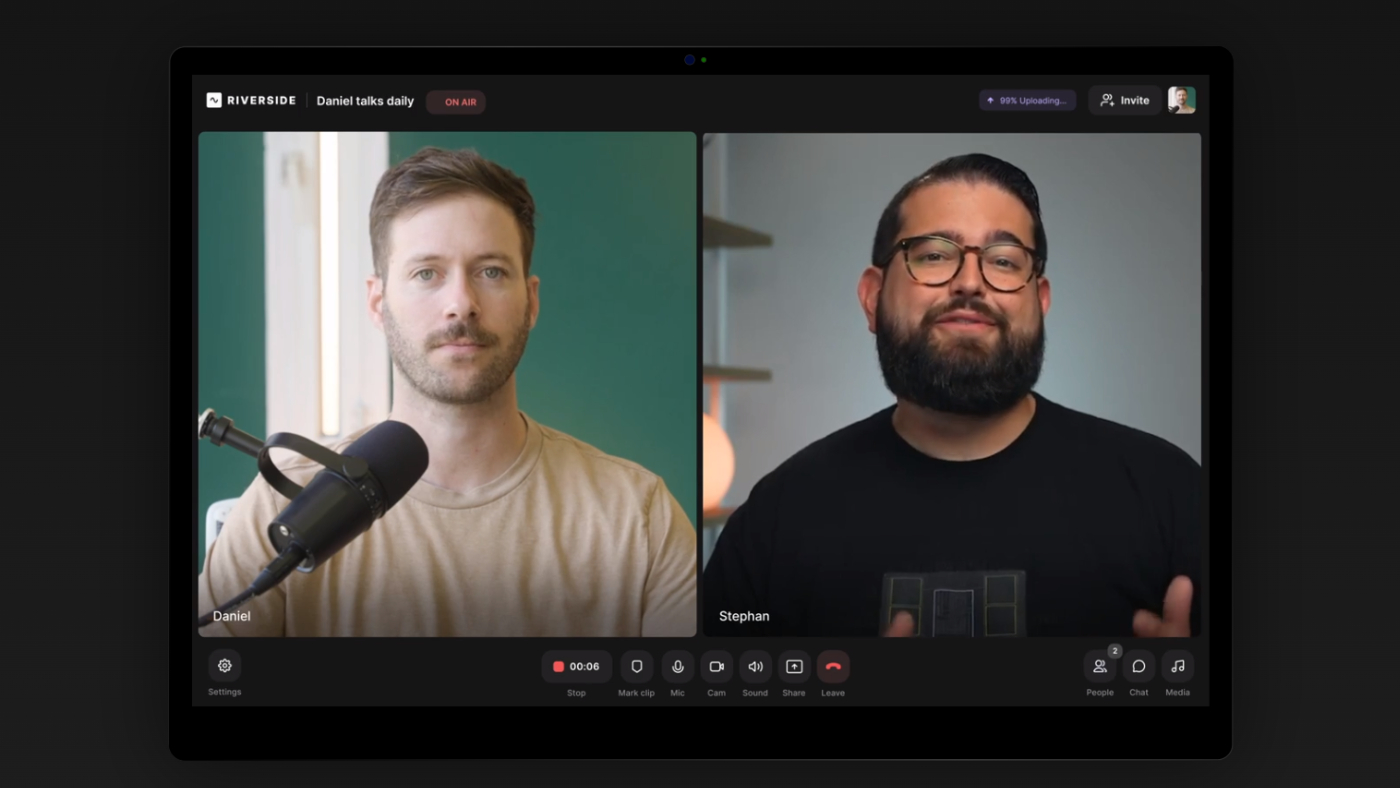
Riverside built its reputation on recording each participant locally and progressively uploading high-quality audio and video. On Pro, it supports up to 4K video and 48kHz audio, with separate tracks that give an editor far more control than a mixed call recording.
That remains the safer default for a remote interview show. When an important guest gives you one hour, you want the recording platform—not the post-production editor—to be the most mature part of the stack.
Does Descript record locally?
Current Descript Rooms documentation says each participant’s high-quality primary recordings upload directly from their device. Descript also creates lower-quality browser-based backups, which appear sooner and can keep a project moving while primary files finish uploading.
That makes the common “Descript only records cloud audio like Zoom” claim outdated. Rooms supports up to ten participants, separate source files and 4K capture when the camera, browser and connection support it.
However, Descript still asks participants to keep the tab open until uploads complete. If an upload stalls, a guest can rejoin or use a recovery link, normally within seven days. Backups exist, but Descript describes them as lower-quality, Zoom-like fallback files.
Local-quality capture does not mean you can close the browser immediately after recording. With either platform, tell guests to wait until their upload is confirmed before leaving.
Recording winner: Riverside. Descript Rooms is now much more competitive, but Riverside’s product is still organised more clearly around remote capture, participant management and reliable separate tracks.
Remote guests: Riverside feels like a studio; Descript feels like an editor with a room attached
For the guest, both products use an invite link and browser-based pre-join flow. The host can select cameras and microphones, record separate tracks and work with multiple participants.
Riverside pulls ahead when the session itself becomes complex. It is better suited to recurring interview shows, producers managing speakers, video podcasts, audience interaction and workflows that may later add livestreaming or webinars.
Descript Rooms is appealing when you want the recording to land directly inside the editor. Once uploads finish, Descript organises the files, creates a multitrack sequence, transcribes the session and applies a multicamera layout. There is less handoff between recording and editing.
There are practical limitations. Rooms currently does not support mobile devices, recordings are limited to four hours per session, and Descript recommends Chrome rather than Firefox for the cleanest compatibility with Studio Sound and audio-drift repair.
Remote guest winner: Riverside. Fastest route from session to detailed editing: Descript.
Editing: Descript remains the stronger post-production tool
Riverside is no longer “record first, export everything elsewhere.” Its editor can work from the transcript, remove filler words and silences, add captions, change layouts and produce social versions. For many simple podcast edits, that is enough.
Descript goes further. The transcript is not just a convenient way to make rough cuts; it is the centre of the application. You can correct transcription without changing media, ignore words non-destructively, edit sequences, rearrange scenes, manage layers and move between the script and timeline when an edit needs precision.
Underlord adds another layer. It can perform multi-step edits, create clips, improve sound, generate supporting media and respond to open-ended editing instructions. This flexibility comes with an AI-credit system and still requires review, but it gives Descript more post-production range.

For dialogue-heavy work, Descript makes large structural edits unusually fast. It is less suitable for complex colour work, motion graphics or cinematic timelines, but Riverside does not solve those professional finishing needs either.
Editing winner: Descript.
AI audio cleanup: Studio Sound vs Magic Audio
Riverside Pro includes Magic Audio, which reduces noise, normalises levels and improves spoken audio with minimal setup. Its appeal is consistency: record the session, enhance it and continue editing in the same platform.
Descript’s Studio Sound is more central to its editing identity. It reduces noise and room echo while reconstructing the voice, and the intensity slider lets you decide how strongly the processed layer replaces the original.
I give Descript the edge because the adjustment matters. Maximum enhancement is not always better; aggressive reconstruction can make a voice sound dense or artificial. Being able to back away from the effect is useful when the original recording is already decent.
Studio Sound consumes Descript AI credits, with a current ceiling of 30 credits per file and application. Heavy use therefore affects which Descript plan offers realistic value. My Studio Sound review explains the best starting intensities and the kinds of damaged audio it cannot repair.
Audio cleanup winner: Descript for control; Riverside for a simpler recording-to-enhancement flow.
Clips and content repurposing
Riverside’s Magic Clips is designed to find moments from a recording and package them for social media. That fits naturally after a video podcast: record once, let the platform identify highlights, then adjust captions and framing.
Descript can also create clips, but its strength is what happens after the first draft. You can edit the clip through the transcript, change scenes, refine layouts, add B-roll and use the wider project context. The process offers more control but may involve more decisions.
If you want the quickest set of social assets directly after a Riverside session, Riverside has the cleaner flow. If you want to reshape the segment into a deliberately edited short, Descript is more flexible.
Neither would be my first choice for automatically producing a large batch of Shorts from every long video. For that use case, compare the specialised workflow in OpusClip vs Descript.
Automatic first drafts: Riverside. Detailed clip editing: Descript.
Video podcasts, mobile recording and live streaming
Riverside is the stronger choice for a video podcast built around remote guests. Pro includes 4K recording, 48kHz audio, separate tracks, host teleprompter access and tools designed around sessions. Higher Riverside plans add live production, audience-growth and webinar features.
Mobile is an important difference. Riverside supports mobile recording, while Descript explicitly says Rooms is not supported on mobile and warns that bypassing the restriction can lead to recordings it cannot troubleshoot or recover.
Descript is better after recording, especially for solo YouTube explainers, tutorials, courses and screen recordings. Creator supports 4K export, but high-resolution export does not automatically mean every source was captured at 4K.
Video podcast capture and live production winner: Riverside. Talking-head post-production winner: Descript.
Which free plan is more useful?
| Free-plan feature | Descript | Riverside |
|---|---|---|
| Main allowance | 60 media minutes per month | 2 hours of separate-track recording, one-off |
| Video quality | Up to 720p export | Up to 720p |
| Audio quality | Depends on source and recording setup | Up to 44.1kHz |
| AI allowance | 100 one-time AI credits | Limited AI and editor access |
| Watermark | Free video exports documented as watermarked | Watermark on Free output |
| Best test | One real editing project | One or two representative guest sessions |
Riverside Free is the better way to test whether guests can join, record and upload successfully. Descript Free is the better way to find out whether editing media through text actually feels faster to you.
Do not interpret either plan as a permanent production setup. Riverside’s two hours of separate tracks are a one-off allowance, while Descript’s 100 AI credits are also introductory rather than a recurring monthly balance. See my detailed guide to what Descript Free includes.
Descript vs Riverside pricing
The cleanest comparison is Descript Creator against Riverside Pro. Both currently cost $24 per month when billed annually, but they meter different things.
| Plan | Monthly billing | Annual rate | What you are buying |
|---|---|---|---|
| Descript Hobbyist | $24/month | $16/month | 10 media hours, 400 AI credits, 1080p export |
| Descript Creator | $35/month | $24/month | 30 media hours, 800 AI credits, 4K and broader AI tools |
| Riverside Pro | $29/month | $24/month | 15 hours of separate-track downloads, 4K, 48kHz, Magic Audio and no watermark |
| Riverside Grow | $39/month | $34/month | 20 separate-track hours plus audience and live-production features |
Descript measures imported and recorded media, then separately meters AI actions. A one-hour Rooms session consumes one media hour even if five participants join; it is not multiplied by participant count.
Riverside’s key limit is separate-track download hours. Pro includes 15 hours per month, which is easier to relate directly to a remote podcast calendar.
Hobbyist is the cheapest reasonable Descript production plan. Riverside does not currently have a comparable $16 annual tier in its main creator lineup, so Descript has the lower entry price. At $24 annually, choose Creator for editing depth or Riverside Pro for recording infrastructure.
For Descript’s AI-credit economics and monthly-versus-annual calculation, see the full Descript pricing guide.
Which one should you choose?
Solo podcast
Pick: Descript
You control the microphone and environment, so post-production is likely the bigger bottleneck. Text editing, filler-word review and Studio Sound offer more value.
Remote interview podcast
Pick: Riverside
The interview cannot always be repeated. Riverside’s participant-focused capture and separate-track workflow deserve priority over deeper editing.
YouTube talking-head videos
Pick: Descript
Remove retakes through the transcript, clean the voice, add captions and finish the complete video without building a remote studio workflow you do not need.
Video podcast with guests
Pick: Riverside
4K capture, independent tracks, layouts and a recording-first studio matter more when several people and cameras are involved.
Course or screen-recorded tutorial
Pick: Descript
The content is mostly scripted explanation and screen media. Descript’s editor is more relevant than Riverside’s remote-session strengths.
Livestream or webinar
Pick: Riverside
Riverside has plans and controls specifically designed for live distribution, audience interaction and event production.
If you choose Descript for podcast post-production, my eight-step podcast editing workflow shows the order I recommend from multitrack setup to final export.
Should you record in Riverside and edit in Descript?
Yes, this remains the strongest workflow for an interview show that values both capture and editing. Export the separate high-quality tracks from Riverside, import them into Descript, build the multitrack sequence, then use transcript editing and Studio Sound during post-production.
The drawback is paying for two subscriptions and moving files between them. At annual creator pricing, Riverside Pro plus Descript Creator is roughly $48 per month before tax and extra usage. That is easy to justify for a business podcast; it may be wasteful for a new solo show.
Start with the platform that solves your highest-risk step. Add the second only after you can name the specific recording or editing problem it will remove.
If the next stage is turning the finished episode into show notes, posts and newsletters, a specialised repurposing tool may be more valuable than a second editor. See Castmagic vs Descript for that decision.
Final verdict: Riverside protects the recording; Descript reduces the edit
I would not declare one universal winner because the products optimise different moments.
Riverside is the better first purchase for remote interviews, video podcasts, mobile contributors and live production. Its editing suite is now capable enough that many creators can record and publish without leaving the platform.
Descript is the better first purchase for solo creators and anyone whose backlog is caused by post-production. Rooms is no longer an afterthought, but transcript editing, Studio Sound and Underlord remain the reasons to choose it.
The simplest decision rule is:
- If losing or degrading the recording would be the disaster, choose Riverside.
- If spending hours cutting and cleaning the recording is the problem, choose Descript.
Use both only when the podcast is valuable enough to justify paying separately for the best capture workflow and the deeper editing workflow.
Frequently asked questions
Is Riverside better than Descript for podcasting?
Riverside is better for recording remote interviews and video podcasts. Descript is better for editing solo podcasts and dialogue-heavy recordings. The right choice depends on whether capture or post-production is your main problem.
Does Descript record locally like Riverside?
Descript Rooms uploads high-quality primary recordings from each participant’s device and also creates lower-quality browser backups. Riverside remains more recording-focused, but claims that Descript only captures a cloud-call mix are outdated.
Can I record in Riverside and edit in Descript?
Yes. Download separate audio and video tracks from Riverside, import them into Descript and create a multitrack sequence. This combines Riverside’s capture workflow with Descript’s deeper editing tools.
Which is easier to use, Descript or Riverside?
Riverside is easier for running a remote recording session. Descript is easier for making large dialogue edits after you understand its script, composition and sequence structure.
Which has better audio quality?
For remote capture, Riverside has the edge with its mature separate-track workflow and up to 48kHz audio on Pro. For repairing and reshaping recorded dialogue, Descript’s Studio Sound provides more adjustment.
Which has better video quality?
Both can work with 4K on suitable paid plans. Riverside is stronger for capturing multiple remote participants in high quality, while Descript Creator supports 4K export and is stronger in post-production.
Which free plan is better?
Riverside Free is better for testing remote recording, with two one-off hours of separate tracks. Descript Free is better for testing text-based editing, with 60 monthly media minutes and 100 introductory AI credits.
Which is cheaper, Descript or Riverside?
Descript has the cheaper paid entry point: Hobbyist costs $16 per month annually. Descript Creator and Riverside Pro both currently cost $24 per month annually, but their usage limits and strengths are different.
Continue reading
Riverside Review 2026See the full recording-first evaluation and workflow limits.
Descript Pricing 2026Compare media hours, AI credits and the real cost of each plan.
Descript Studio Sound ReviewSee what the audio enhancer fixes and when it sounds unnatural.
How to Edit a Podcast in DescriptFollow the complete workflow from separate tracks to final export.
Source note: Descript Rooms recording, upload, backup and recovery behavior was checked against the company’s guides to Rooms project files, recording in Rooms and upload recovery. Riverside plan prices, separate-track allowances, 4K video and audio quality were checked against the official Riverside pricing page. Descript allowances were checked against Descript pricing. Prices and plan features can change after publication.