

vidIQ will not make a mediocre video rank. It cannot repair a weak opening, invent credibility or force viewers to care. What it can do is make the research around a YouTube video faster—and keep a creator from confusing “I like this idea” with “people are looking for this idea.”
That makes vidIQ useful, but in a narrower way than its marketing can imply. I see it as a research habit wrapped in a browser extension, an idea engine and an AI coach. The subscription is worth paying for only when those prompts change what you publish.
My verdict
Boost is the sensible paid plan for a solo creator who publishes consistently. Free is enough to learn the workflow. Max is mainly for creators who will genuinely use more AI Coach conversations and the larger clipping/generation allowance.
What it is not
A secret YouTube ranking switch, a replacement for YouTube Studio, or proof that a keyword deserves a video.
I tested the idea, not the feature list
A useful review should follow one video from uncertainty to evidence. My test question was: “Should a small creator publish a comparison of two AI video editors?” I used vidIQ to explore demand, inspect adjacent videos, sharpen the title, think through the thumbnail and diagnose the result after publishing.
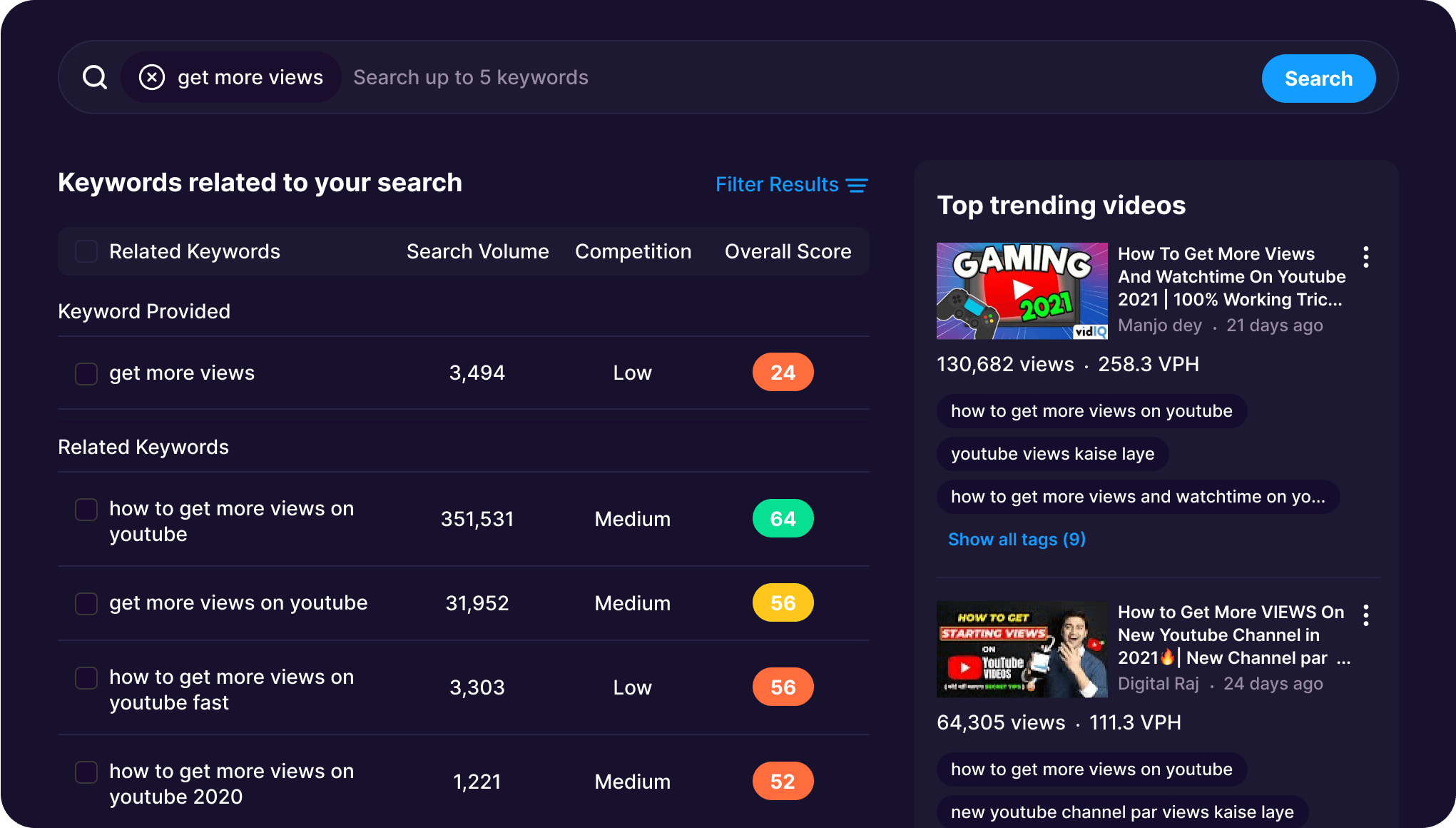
1. Topic discovery Useful
Keyword search, trends, outlier videos and personalized ideas reveal how a broad subject breaks into specific viewer problems. I care less about a single score than repeated language across titles and comments. An “easy” keyword with weak relevance is still a bad idea.
2. Competitive context Very useful
The extension puts useful context beside YouTube results, including velocity and related data. Outliers are particularly helpful: they expose videos performing unusually well for the size of the channel. That is a better creative clue than copying the largest channel in the niche.
3. Title and thumbnail work Mixed
The suggestions are excellent for escaping a blank page. They are not an editor. Left unchecked, the AI leans toward dramatic promises, overlong titles and familiar thumbnail language. I keep the specificity and delete the theater.
4. AI Coach Context-dependent
Because the coach can use channel context, it asks better questions than a generic chatbot. The good use is diagnosing a decision: which topic fits the existing audience, what pattern appears across recent uploads, and what experiment to run next. The bad use is asking it to “make me viral.”
5. Post-publish diagnosis Necessary
vidIQ adds interpretation, but YouTube Studio remains the source of truth for impressions, click-through rate, retention and returning viewers. If the thumbnail earns the click and the opening loses the viewer, more keyword research is not the fix.
The features that earn a place in my workflow
Outliers and trend research are the most defensible reason to subscribe. They help identify formats and questions gaining traction before a creator blindly copies a topic whose peak has passed.
Daily ideas are useful as prompts, not a publishing calendar. I save an idea only if I can add first-hand experience, a test or a point of view. This is the same standard I use when planning a practical tool review such as our VEED review: search demand opens the door, but evidence must carry the article or video.
The browser extension reduces tab-switching. That sounds minor until research is repeated several times a week. Thumbnail tools speed up rough concepts and comparisons, although I still want a human to simplify the final frame.
AI clipping and generation on Max can be useful after a long video exists. If repurposing is the main job, however, a dedicated clip tool is usually more focused. Read our OpusClip review or the beginner guide to AI clip generators before buying Max for one secondary feature.
The trap: optimizing for the tool’s approval
A creator can spend an hour pushing a score from 78 to 92 and make the title less human in the process. Scores are compressed estimates, not the viewer. If a shorter, clearer title loses points but better expresses the promise, I publish the clearer title.
vidIQ pricing in 2026
| Plan | Current allowance | Who I think it suits |
|---|---|---|
| Free — $0 | 150 AI credits monthly, limited trend/idea data and AI Coach tips | New channels learning research discipline |
| Boost — $19 monthly or $199 yearly | 2,000 AI credits, unlimited trend research, optimization, thumbnails, subscriber insights and deeper Coach tools | Consistent solo creators; my value pick |
| Max — $49 monthly or $468 yearly | 6,000 credits, up to 3× Coach conversations, Max Mode and up to 11 hours of clipping/generation | High-output creators using the AI workflow every week |
| Enterprise — custom | Team roles, cross-channel reporting and support for larger channel portfolios | Organizations managing more than three channels |
These are current US web prices checked on August 23, 2026. App-store billing, taxes, promotions, country and channel count can change the total.
Free versus Boost: the only test I trust
Stay on Free for four videos. Before each one, record the original topic and packaging. Then use vidIQ and write down every decision that changes: a narrower query, a different comparison, a stronger promise, a clearer thumbnail.
If the tool changes nothing—or only adds keywords to the description—do not upgrade. If it repeatedly helps you reject weak topics, spot an outlier early or produce a cleaner package, Boost can pay for itself long before it produces a measurable revenue bump.
For talking-head creators, packaging is only half the system. Our guide to turning a YouTube video into Shorts handles the distribution side, while turning one video into ten social posts shows how to extend the original idea across formats.
What vidIQ gets wrong—or cannot know
It cannot see a viewer’s emotional reason for clicking as clearly as a creator who speaks to that audience every day. It can overvalue topics with measurable search demand and undervalue a story that travels through browse and recommendations. AI title suggestions can converge on the same high-energy language every competing creator receives.
Most importantly, it cannot replace retention analysis. A great query earns an impression. The title and thumbnail earn a click. The video earns the next minute. A creator who blames “SEO” for a weak first 30 seconds will learn the wrong lesson.
That is why I pair research with a production tool, not more research. If transcript editing is the bottleneck, our Descript review is more relevant. If automated vertical clips are the bottleneck, compare OpusClip and Vizard.
Who should pay—and who should not
I would buy Boost if…
- You publish at least twice a month
- You work in a searchable, competitive niche
- Topic choice and packaging are recurring bottlenecks
- You will review results in YouTube Studio
I would stay free if…
- You are still learning to finish videos
- Your channel is mostly personal or event-driven
- You want the tool to guarantee views
- You rarely act on research findings
My final recommendation
vidIQ is worth it for a working creator, not because it knows the algorithm, but because it turns scattered research into a repeatable pre-publish routine. Start free. Measure whether it changes four decisions. Upgrade to Boost when the evidence says yes. Buy Max only when the AI Coach and clipping allowances already have a scheduled place in your week.
Frequently asked questions
Is vidIQ free?
Yes. The free plan currently includes 150 AI credits per month plus limited ideas, trends and AI Coach guidance.
Is vidIQ safe to connect to YouTube?
vidIQ is a widely used YouTube tool, but you should still review requested Google permissions, enable account security and remove access to tools you stop using.
Can vidIQ guarantee more views?
No. It can improve research and packaging decisions. Viewer response, retention, satisfaction and the quality of the video still determine performance.
Is Boost better than Max?
Boost is the better value for most solo creators. Max makes sense when you will use the larger AI Coach and clipping/generation allowances consistently.
Last fact-checked: August 23, 2026.