

Castmagic makes an appealing promise: give it one podcast, interview or talking-head video, and it will turn the recording into transcripts, show notes, newsletters, blog drafts and social posts. After using it in a real content-repurposing workflow, I think the promise is directionally right—but the word drafts matters.
Castmagic did not replace my judgment or hand me ten polished posts that I could publish without reading. What it did was remove the blank page. It extracted the ideas, organised the recording and gave me several useful starting points much faster than working through the video manually.
Last checked: August 14, 2026. Features and plan details were verified against Castmagic’s current website. Pricing can change, so confirm the checkout total before subscribing.
Quick verdict: Castmagic is worth testing if you regularly publish podcasts, interviews, webinars or long talking-head videos and need written content from each recording. It is strongest at transcripts, summaries, show notes and transcript-aware prompting. It is weaker as a finished long-form writer and is not a substitute for a dedicated short-video editor. My overall rating is 4.1/5.
What Is Castmagic?
Castmagic is an AI content-repurposing workspace built around recorded audio and video. You import a podcast episode, interview, meeting, webinar or video; Castmagic transcribes it and uses that source material to generate different written assets.
The important distinction is that Castmagic is not primarily a generic AI writer. Its advantage is context. The transcript, speaker labels, timestamps and extracted ideas stay connected to the original recording, so you can ask for an email, a LinkedIn post or a list of quotes without repeatedly pasting the source into a separate chatbot.
Castmagic currently advertises audio and video imports, YouTube and Vimeo links, RSS, Zoom, Google Drive, Zapier and other sources. Its main tools include transcription, preset and custom content outputs, Magic Chat, timestamps, show notes, quotes, clips and audiograms. The company also lists support for more than 60 languages. These are product capabilities, not a guarantee of equal transcription quality for every language or recording.
How I Tested Castmagic
I tested Castmagic as part of a practical repurposing workflow built around one approximately 20-minute conversational video. This was clear, English-language talking-head content—not a noisy group call or a heavily edited documentary.
My goal was not to count how many buttons Castmagic offers. I wanted to know whether one recording could become a useful content package without creating more editing work than it removed.
I reviewed the following outputs:
- The transcript and speaker structure
- A summary and timestamped overview
- Show notes
- Quotes and key takeaways
- Short social captions
- A LinkedIn-style post
- An X/Twitter thread
- An email newsletter draft
- A blog-post draft
- Custom answers generated through Magic Chat
This written-content track was paired with OpusClip for short videos. The complete process is documented in my one-video-to-10-social-posts workflow.
Testing note: The ratings below are editorial judgments from this workflow, not laboratory accuracy percentages. Transcription and output quality will change with audio clarity, accents, overlapping speakers, subject matter and the prompts you use.
Castmagic Test Results
| Test area | Rating | What I found |
|---|---|---|
| Transcription | 4/5 | Clean conversational speech produced a solid working transcript. Names, punctuation and specialist terms still deserved a manual check. |
| Summaries and show notes | 4.5/5 | The most immediately useful outputs. They captured structure and saved me from rewatching the entire recording to rebuild an outline. |
| Quotes and takeaways | 4/5 | Good for creating a shortlist, but I still checked every quote against its surrounding context. |
| Social posts | 3.5/5 | Useful first drafts. Preset outputs could sound generic until I tightened the prompt and removed unnecessary hooks or hashtags. |
| Long-form writing | 3/5 | Helpful for structure and idea extraction, but the blog draft needed the most rewriting for voice, evidence and natural transitions. |
| Magic Chat | 4.5/5 | The standout feature. Follow-up prompts were more useful than repeatedly generating generic templates. |
| Ease of use | 4/5 | Uploading and generating outputs are approachable. Learning which prompts and output styles deserve saving takes longer. |
| Overall | 4.1/5 | A strong production assistant for recurring spoken content, as long as you treat its writing as a first draft. |
The pattern was consistent: the closer an output stayed to the source, the better it was. A transcript, factual summary or timestamped outline required less interpretation and was therefore more dependable. A finished blog post or promotional email required more editorial choices, so the result became more generic and needed more rewriting.
How the Castmagic Workflow Works
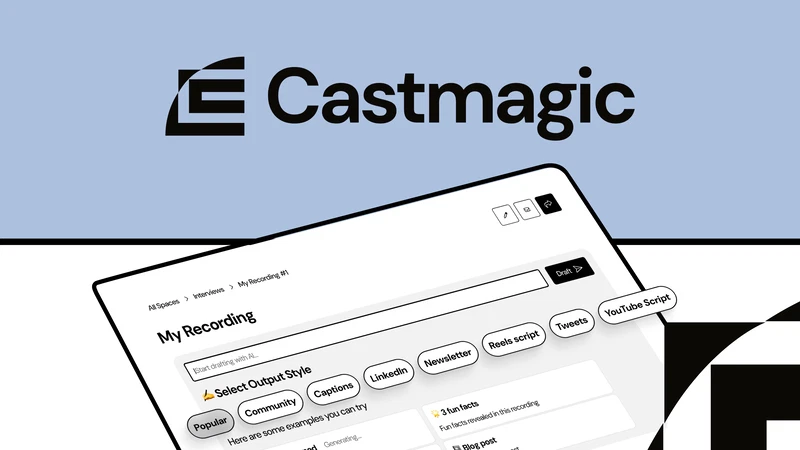
The basic process is simple:
- Upload a local audio or video file, or use a supported import source.
- Choose the language and allow Castmagic to create the transcript.
- Check speaker labels, names and important terminology.
- Open the available content outputs or create a custom prompt.
- Generate show notes, summaries, posts, emails or other assets.
- Use Magic Chat to ask for more specific angles or corrections.
- Edit, fact-check and move the useful outputs into your publishing tools.
The third step is easy to underestimate. If a product name is wrong in the transcript, that error can travel into the summary, email and blog draft. Correcting the source before generating everything else is faster than fixing the same mistake in ten separate outputs.
I would also resist generating every available template. That feels productive, but it quickly creates a folder full of similar drafts. Start with the channels you actually publish on. For a solo podcaster, that might be show notes, one newsletter, one LinkedIn post and a bank of quotes—not twenty-seven speculative assets.
Transcription, Summaries and Show Notes
Transcription is the foundation of the product. With a clear single-speaker recording, Castmagic gave me a workable text version that was much easier to scan than replaying the source video. The transcript also made the rest of the workspace more useful because I could move between the recording, timestamps and generated content.
I would still check:
- People, company and product names
- Numbers, prices and dates
- Technical vocabulary
- Speaker changes in interviews
- Sentences affected by cross-talk or background noise
Summaries and show notes were more convincing than the promotional social copy. They stayed close to what was actually said and turned the recording into a usable structure. For a weekly podcast, this is where Castmagic can remove repetitive work: episode overview, key topics, timestamps, takeaways and a starting description all come from the same source.
There is still a difference between “accurate enough to navigate” and “accurate enough to quote.” Before publishing a direct quotation, I would replay the surrounding section. AI can capture the words while missing the tone or context that made them meaningful.
Are Castmagic’s Written Outputs Publish-Ready?
Usually, no—and that is not necessarily a failure.
The shorter outputs were easier to salvage. A list of takeaways could become captions, and a LinkedIn draft often contained a useful central idea. The editing work was mostly removing predictable hooks, reducing repetition and rewriting the ending in a voice I would actually use.
The blog draft required more attention. It could organise the source into headings and expand the major points, but it could not add firsthand evidence that was never present in the recording. It also tended to smooth out the speaker’s sharper opinions into safer, more general prose.
That creates an important rule:
Use Castmagic to extract and reshape what the recording contains. Do not rely on it to invent the research, experience or examples that the recording lacks.
For a strong article, I would take the transcript-derived outline, preserve the most specific observations, verify factual claims and then rewrite the introduction, transitions and conclusion manually. That is still faster than beginning with an empty document, but it is not one-click publishing.
How to Get Better Outputs
The preset templates are useful for learning the product. Custom prompts are what make it fit a real content system. Instead of asking for “a LinkedIn post,” specify:
- Who the post is for
- The one point it should make
- The desired length
- Words and phrases to avoid
- Whether it should include a question or call to action
- A sample of your normal tone
- A requirement to use only claims supported by the transcript
A narrow prompt normally produces one stronger asset than a broad request for ten platform variations. Castmagic saves those repeatable output styles, which is more valuable after you have refined a format you publish every week.
Magic Chat Is the Best Part
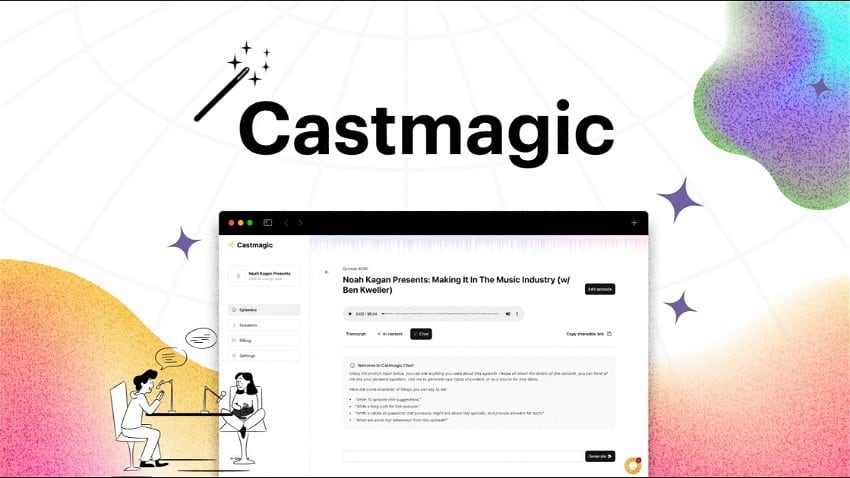
Magic Chat turns each recording into a focused chat workspace. Instead of asking a general model to guess what happened in an episode, you can ask questions against the transcript in context.
I found it most useful for targeted requests such as:
- “Find three moments where the speaker gives a concrete recommendation.”
- “Turn the second main point into a short email without adding new claims.”
- “List quotations about the cost of manual editing with timestamps.”
- “What objections did the speaker raise, and how were they answered?”
- “Create a LinkedIn post around one idea rather than summarising the entire video.”
This is better than endlessly regenerating a preset because it lets you narrow the brief through follow-up questions. It also makes Castmagic useful as a content-research layer: I can search an episode for an example or viewpoint without scrubbing through the timeline.
It is still possible for an AI answer to overstate or misread the transcript. If an output contains a precise claim, quotation or number, verify it in the original recording before publication.
What About Video Clips and Audiograms?
Castmagic includes media clipping and audiogram tools, but I would not buy it primarily to create YouTube Shorts, TikToks or Reels. Its strongest advantage is the written content layer.
For automated highlight discovery, dynamic vertical reframing, subtitle styling and faster short-video production, a dedicated clip generator is a better fit. My OpusClip review tests that automation-first workflow, while the Vizard AI review looks at a clipper with more hands-on editing control.
If the recording has not been made yet, my Riverside review covers the remote recording and separate-track workflow. Once the conversation is captured, Castmagic handles the written repurposing layer.
This is why I used two tools in the same workflow:
- OpusClip: find and format short video candidates.
- Castmagic: turn the source into transcripts, summaries and written posts.
There is some overlap, but the jobs are different. If you only need Shorts, Castmagic is unnecessary. If you only need show notes and written distribution, paying for a dedicated video clipper may be unnecessary.
Castmagic Pros and Cons
What I liked
- One recording becomes an organised set of written drafts
- Summaries and show notes stay close to the source
- Magic Chat makes recordings easier to search and reuse
- Custom outputs can support repeatable weekly formats
- Transcript, timestamps and content generation live together
- Useful for podcasts, interviews, webinars and talking-head videos
What I did not like
- Long-form drafts still need substantial editorial work
- Preset social copy can sound generic
- Every factual claim and quotation needs checking
- Generating too many templates creates content clutter
- It is not a full audio or video production editor
- The value is weak for creators who publish irregularly
Castmagic Pricing in 2026
Castmagic’s pricing model changed recently, which explains why many reviews show conflicting plan names and prices. As checked on August 14, 2026, the official pricing page lists:
| Plan | Monthly billing | Annual rate shown | Best fit |
|---|---|---|---|
| Hobby | $29/month | $19/month equivalent | Solo creators testing a regular repurposing workflow |
| Starter | $69/month | $48/month equivalent | Creators with a larger content library and more recurring outputs |
| Team | $199/month | $139/month equivalent | Small teams that need multiple seats and shared content operations |
| Business & Scale | From $999/month | From $699/month equivalent | Studios, publishers and higher-volume organisations |
The current page describes the transcription allowance as a growing library total: 30 hours on Hobby, 100 on Starter and 400 on Team. It also says plans include unlimited AI content, Studio clips and integrations, with additional transcription hours available to purchase. That is different from older monthly-minute descriptions still visible in some search results.
Check the live Castmagic pricing page before buying. In particular, confirm whether the allowance is a one-time library total, how additional hours are priced and what happens to your workspace if you cancel. Those details matter more than the headline monthly price.
Which Plan Would I Choose?
For one creator, I would begin with Hobby and upload a real recent episode—not a two-minute demo. Generate the exact deliverables you normally make and record how much editing remains. Upgrade only if the transcription allowance or workspace limits become a genuine constraint.
Starter and Team are not automatically “better” because they include larger numbers. Their value depends on publishing volume, repeatable formats and collaboration. If you create one podcast every few months, a general AI assistant plus manual transcription may cost less overall.
Castmagic vs the Main Alternatives
| Tool | Best for | Main limitation compared with Castmagic |
|---|---|---|
| ChatGPT | Flexible writing, research and rewriting across many tasks | You need to supply and organise the transcript, prompts and workflow yourself. |
| Descript | Editing complete podcasts and videos through a transcript | Content repurposing is not as focused around generating a large written asset library. |
| OpusClip | Automatically finding and formatting short-video moments | It is designed around clips, not newsletters, show notes and long-form written content. |
| Vizard | Creating short clips with a more flexible browser editor | Its main workflow is still video repurposing rather than audio-to-written-content production. |
Castmagic vs ChatGPT
ChatGPT is more flexible and can produce excellent writing from a transcript when prompted carefully. Castmagic is more convenient for a repeated recording-to-content workflow. It keeps the media, transcript, timestamps, prompts and outputs together.
If you repurpose one recording occasionally, that convenience may not justify another subscription. If you process a new episode every week, the saved setup and organisation become more meaningful.
Castmagic vs Descript
Choose Descript when the recording itself still needs editing: removing mistakes, restructuring dialogue, cleaning audio or assembling the final episode. Choose Castmagic when the finished recording exists and your next problem is distributing its ideas through written channels. The Castmagic vs Descript comparison breaks down that media-editing versus written-repurposing decision.
The same distinction appears in my OpusClip vs Descript comparison: automatic repurposing and full production editing sound similar in a feature list, but they solve different stages of the workflow.
Is Castmagic Worth It?
Castmagic is worth it for creators who publish spoken content consistently and repeatedly create the same written assets from it.
I would recommend it to:
- Weekly podcasters who need show notes, summaries and newsletters
- Interview-based YouTube creators who want written distribution
- Coaches and consultants repurposing calls, webinars or presentations
- Small content teams managing several recurring shows
- Creators with an established brand voice and repeatable output templates
I would skip it if:
- You mainly want automatic Shorts or Reels
- You publish long-form content only occasionally
- You expect finished articles without fact-checking or rewriting
- You need detailed multitrack audio or full-video editing
- You do not yet know which channels you can maintain consistently
The subscription makes sense when it replaces a recurring bottleneck. It makes less sense when it simply produces more drafts for channels you were never going to publish on.
Final verdict: Castmagic earns 4.1/5. Its value is not “one recording becomes perfect content everywhere.” Its value is that one recording becomes searchable, structured and much easier to reuse. For a weekly podcaster or interview creator, that can remove a substantial amount of repetitive preparation. For an occasional creator—or anyone looking mainly for video clips—it is the wrong subscription.
Frequently Asked Questions
Is Castmagic any good?
Yes, particularly for converting podcasts, interviews and talking-head videos into transcripts, show notes, summaries and written first drafts. Its long-form and promotional outputs still require editing.
Is Castmagic free?
Castmagic promotes an opportunity to try the product, but its current pricing page does not list a permanent free plan. Check the live signup and pricing pages for the current trial allowance before entering payment details.
How much does Castmagic cost?
As checked on August 14, 2026, monthly prices start at $29 for Hobby, $69 for Starter and $199 for Team. Lower equivalent monthly rates are displayed with annual billing. Prices and plan structures can change.
What does Castmagic do?
It transcribes audio or video and uses the recording to generate show notes, summaries, quotes, social posts, newsletters, blog drafts and custom outputs through Magic Chat.
Is Castmagic good for podcasts?
Podcasts are one of its strongest use cases because each episode can become a transcript, timestamped overview, show notes, newsletter and set of promotional posts inside one workspace.
Can Castmagic create video clips?
Castmagic includes clips and audiograms, but a dedicated tool such as OpusClip or Vizard is usually a better choice when short-form video is the main deliverable.
Is Castmagic better than ChatGPT?
Not universally. ChatGPT is more flexible; Castmagic provides a more organised, transcript-centred workflow for recurring recorded content. The right choice depends on whether that convenience justifies another subscription.
Does Castmagic replace Descript?
No. Descript is better suited to editing the original podcast or video. Castmagic is better suited to turning a completed recording into multiple written assets.
Are Castmagic blog posts ready to publish?
In my test, they were useful structural drafts rather than finished articles. They still needed fact-checking, stronger examples, a more natural voice and manual editing.
Product facts checked on August 14, 2026 against the official Castmagic features page, podcast transcription page and pricing page. Hands-on ratings are editorial assessments from the workflow described above, not vendor accuracy claims.