

OpusClip and Descript now overlap, but they still solve different first-order problems. OpusClip asks, “Which moments should become Shorts?” Descript asks, “How should this recording be edited?” That difference matters more than any feature checklist.
I would choose OpusClip when the job is turning one long recording into a batch of social clips with minimal intervention. I would choose Descript when the recording itself still needs shaping: cutting weak answers, removing filler words, repairing audio, rearranging sections, adding supporting visuals, and then extracting a few clips.
OpusClip vs Descript: The Real Difference
| Question | OpusClip | Descript |
|---|---|---|
| Core job | Find and generate multiple short clips automatically | Record, transcribe and edit complete audio or video projects |
| Best starting point | A finished long-form video | Raw or partly edited recordings |
| Main interface | AI-generated clip results and a focused clip editor | Transcript, scenes, canvas and timeline |
| Best strength | Speed and batch output | Editorial control and audio/video finishing |
| Main compromise | Less control over the full long-form story | More decisions and a longer learning curve |
| My pick for beginners | Fastest first batch of Shorts | Best first serious editing workspace |
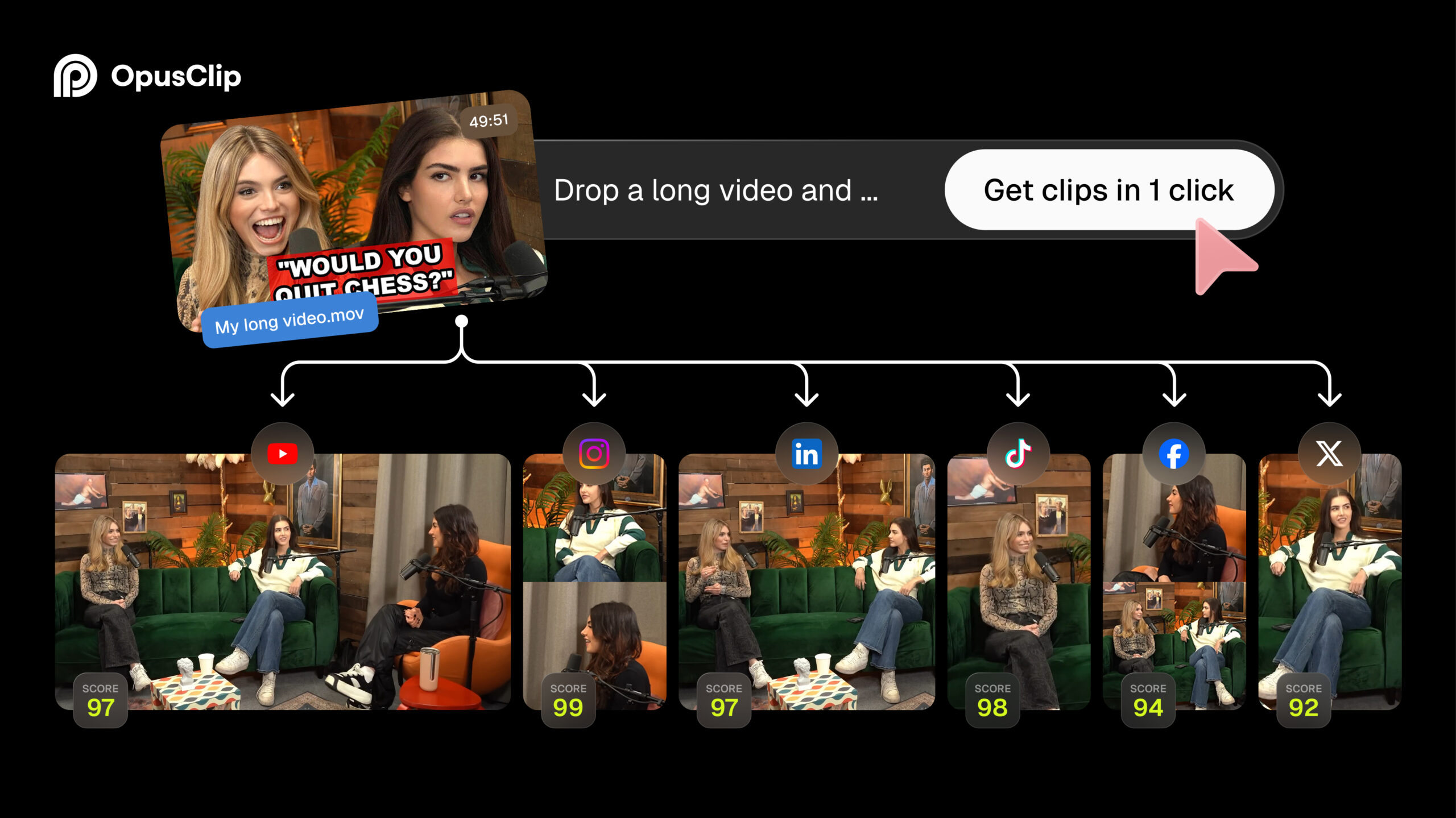
Calling both products “AI clippers” hides the most useful distinction. OpusClip is purpose-built around repurposing. You submit a YouTube link or file, tell it what you want, and it looks for hooks and self-contained moments. Its ClipAnything model can use visual, audio and sentiment cues, not just spoken words. That is helpful when a promising moment is defined by a reaction or action rather than a neat paragraph of dialogue.

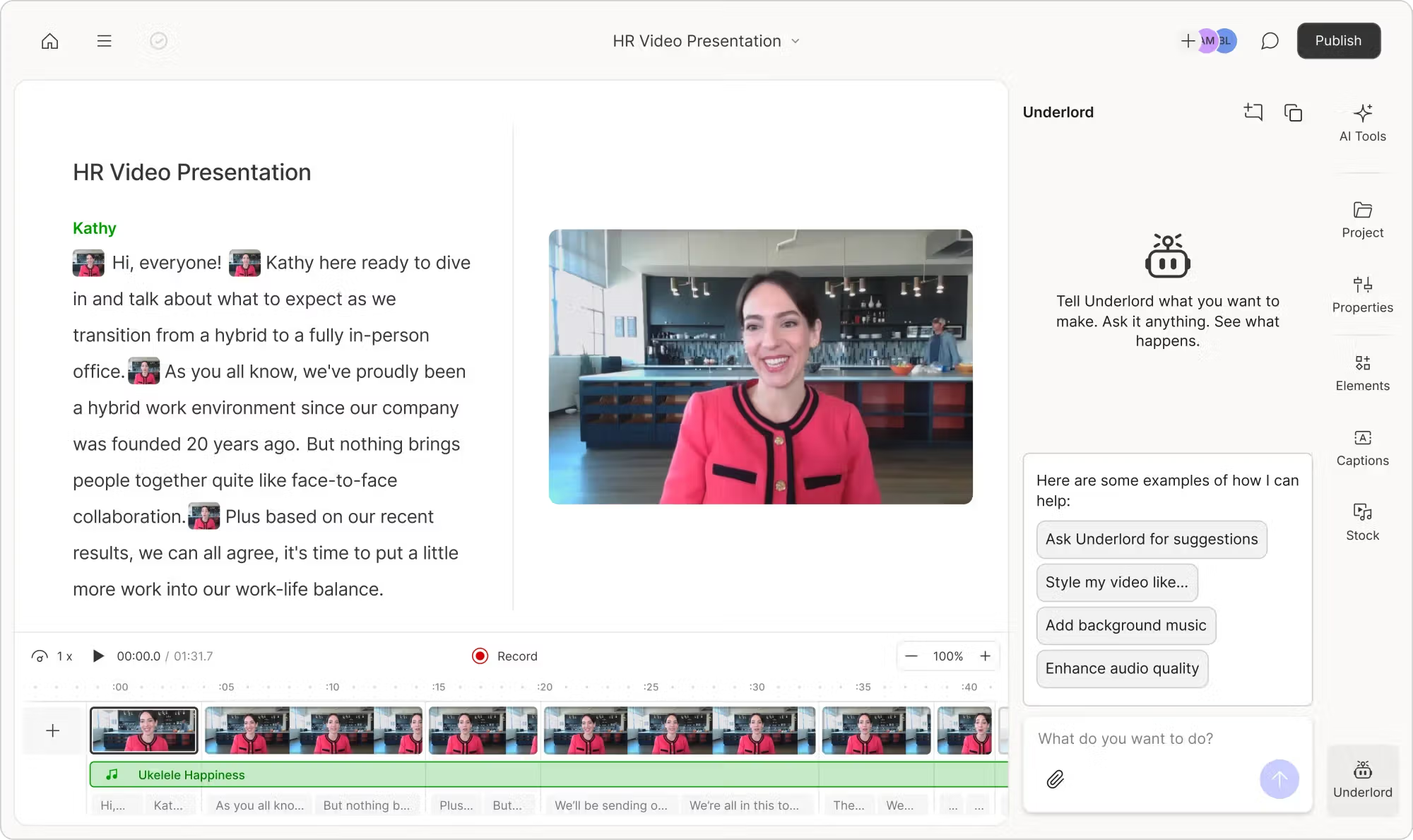
Descript is broader. Its central idea is that you can edit audio and video by editing the transcript. Delete a sentence and the corresponding media disappears; move text and you can restructure the recording. Its AI co-editor, Underlord, can create clips, but those clips live inside a larger production environment. Descript’s official workflow turns each generated clip into its own editable composition rather than treating the export as the end of the process.
This is why a simple “which tool has more features?” comparison is misleading. Descript plainly has the wider editing system. OpusClip can still be the better purchase if full editing is not the problem you are paying to solve.
Automatic Clipping or Full Video Editing?
Choose OpusClip for throughput
You already have a finished episode and need several vertical clips quickly. The AI makes the first editorial pass, reframes speakers, adds captions and gives you a ranked set of candidates.
Choose Descript for control
You need to improve the source itself. Transcript editing, audio cleanup, filler-word removal, scenes and a conventional timeline give you far more room to shape the final story.
With OpusClip, the ideal workflow is deliberately short:
- Import a completed long video.
- Set the processing range and clip preferences.
- Review the AI’s suggested clips.
- Correct captions or framing where needed.
- Export or schedule the strongest results.
That narrow workflow is a strength. In my experience, creative tools often become slower as they add more possibilities. OpusClip keeps the question small: which clips are worth publishing? If you want to see that process in context, our YouTube-to-Shorts guide walks through the practical options.
Descript adds a real editorial layer before and after clip generation. You can record remote guests, import separate tracks, clean the sound, edit the conversation through text, refine visual scenes, ask Underlord to create clips, and then keep editing each result. This is slower than clicking “generate,” but it prevents you from bouncing between a transcription app, an audio repair tool and a video editor.
The trade-off is mental overhead. A new Descript user has to understand compositions, scenes, layers, the script and the timeline. None is especially difficult alone, but together they make Descript feel like a creative application. OpusClip feels more like a service: give it a source, inspect the output.
Which Is Better for Podcasts?
For producing a podcast, I would choose Descript. For promoting an already edited podcast, I would choose OpusClip.
Why Descript is better for the main podcast
Podcast editing is usually more than finding quotable moments. You may need to remove a false start, tighten a rambling answer, balance voices, improve weak audio, preserve separate speaker tracks, add an introduction and export the finished audio episode. Descript supports recording and importing, transcript-based editing and tools such as Studio Sound and filler-word removal in one workspace.
Its Rooms workflow can record remote participants separately, which gives you more control when one guest has a weak microphone or unstable connection. OpusClip is not trying to replace that production stage. Feeding raw, repetitive conversation directly into an automatic clipper may produce social content, but it does not give you a polished full episode.
Why OpusClip is better for podcast promotion
Once the episode is finished, the equation changes. A 60-minute interview may contain ten promising ideas, and manually locating them is tedious. OpusClip is better at scanning the whole episode and returning a batch. Its automatic vertical reframing is especially useful for video podcasts where two speakers need to remain readable on a phone.
Descript can also create clips: you can ask Underlord for a specific number, duration, platform and tone. I like that control, and every result stays editable. But if the weekly job is simply “turn each episode into eight candidates,” OpusClip feels faster and more purpose-built.
Which Is Better for YouTube Talking-Head Videos?
For a scripted, single-camera talking-head video, Descript is the better primary editor. The transcript makes it quick to remove repeated lines and awkward pauses. You can change the sequence, insert B-roll or screen recordings, improve the voice track and control the full YouTube cut.
OpusClip becomes more attractive after that main edit is locked. It can search the finished video for sections that stand alone without requiring you to duplicate the project and manually build every vertical version. If your long-form video already has a clear structure and good delivery, the automatic results can be surprisingly close to publishable.
There is one exception: if you record long, lightly structured monologues or livestreams and the horizontal upload is already complete enough, OpusClip may save more time. You are not really editing a YouTube video at that point; you are mining it for short-form ideas.
Which Has the Lower Learning Curve?
OpusClip is easier to get a result from. Descript is easier than a traditional timeline editor to learn deeply, but it still takes longer.
A first-time OpusClip user can understand the core path without a tutorial: import, process, review and export. The AI makes most early decisions. That is why it also beat more hands-on alternatives in our beginner AI clip generator test.
Descript’s text editing is intuitive once the transcription appears, yet serious use requires more concepts. You need to understand the relationship between transcript edits and media, when to use scenes, how the canvas differs from the timeline, and which AI actions consume credits. The reward is much greater control; the cost is that you are learning an editor rather than approving AI suggestions.
| Beginner task | Easier tool | Why |
|---|---|---|
| Generate a first batch of Shorts | OpusClip | Fewer decisions between import and results |
| Correct the wording of a long recording | Descript | Edit the media through its transcript |
| Refine one specific social clip | Descript | More editorial and visual control |
| Process a new episode every week | OpusClip | A more repeatable batch workflow |
| Replace several separate production tools | Descript | Recording, audio, video and clips in one project |
Editing Control, Export Quality and Free Limits
Descript wins editing freedom comfortably. Its clips remain proper projects: you can change the words, timing, layout and supporting media. OpusClip provides useful short-form corrections, but it is not where I would rebuild a ten-minute YouTube story or mix a full podcast.
Free-plan numbers also need context. OpusClip currently offers 60 processing credits per month, renders up to 1080p, adds a watermark, offers no editing on Free and makes clips unexportable after three days. Our full OpusClip free-plan test explains those restrictions, while our OpusClip pricing analysis calculates when paid credits begin to make economic sense.
Descript’s current Free plan is measured differently: it includes 60 media minutes per month, while AI features draw from a separate credit pool. Free video exports are limited to 720p and carry a Descript watermark. Paid Hobbyist currently includes 10 media hours, 400 monthly AI credits and watermark-free 1080p export; Creator raises the ceiling to 30 media hours, 800 AI credits and 4K. Because the systems count usage differently, “60 minutes vs 60 minutes” is not a complete cost comparison.
Plan facts checked against the official OpusClip pricing page, OpusClip plan documentation, Descript pricing page and Descript Create Clips guide on August 13, 2026.
Export resolution should not decide this comparison by itself. A well-edited 1080p talking-head video is more valuable than an automatically upscaled clip with a weak opening. Likewise, a fast clip that captures the right idea can outperform a painstaking 4K edit. Choose based on the work before export, then buy the plan that removes the resolution and watermark limitations you actually encounter.
Which One Should You Choose?
Choose OpusClip if…
- You already have finished long-form videos.
- You need several Shorts from every upload.
- Finding moments takes longer than polishing them.
- You want automatic reframing and captions with minimal setup.
- Your priority is publishing volume.
Best for: clip-first creators and repurposing workflows.
Choose Descript if…
- You edit podcasts or talking-head videos from raw footage.
- You prefer editing through words rather than only a timeline.
- Audio cleanup and narrative structure matter.
- You want to refine every generated clip.
- Your priority is control and finished quality.
Best for: podcasters, interviewers and solo video editors.
If you are still unsure, identify the task you postpone every week. If it is finding enough clips, choose OpusClip. If it is editing the episode, choose Descript. Paying for a wider feature set does not help when it does not target your bottleneck.
My overall recommendation is straightforward: OpusClip wins as an automatic clip generator; Descript wins as a complete creator workspace. Descript is my pick for podcast production and carefully edited YouTube talking heads. OpusClip is my pick for consistently converting those finished recordings into social inventory.
For a closer look at OpusClip’s actual output and interface, read our hands-on OpusClip review. If your shortlist includes another dedicated clipper rather than a full editor, our OpusClip vs Vizard comparison is the more relevant head-to-head.
Frequently Asked Questions
Is Descript better than OpusClip?
Descript is better for editing full podcasts and videos. OpusClip is better for automatically finding and generating multiple short clips from finished long-form content.
Can Descript automatically create Shorts?
Yes. Descript’s Create Clips tool and Underlord can generate short clips from a transcript, and every result becomes an editable composition. OpusClip remains the more focused batch-clipping workflow.
Which is better for a video podcast?
Use Descript to record, clean and edit the main episode. Use OpusClip when your priority is extracting and reframing many promotional clips. A serious weekly podcast may benefit from both.
Which is easier for beginners?
OpusClip is easier for producing a first batch of Shorts. Descript takes longer to learn because it offers much more control, though its transcript-based editing is more approachable than many traditional editors.
Can OpusClip replace Descript?
Not for full production. OpusClip can replace the manual process of finding and reframing clips, but it does not replace Descript’s recording, transcript editing, audio repair and long-form project controls.
Do OpusClip and Descript have free plans?
Yes. Both currently provide limited free usage and add watermarks to standard free video exports. OpusClip Free renders up to 1080p but does not include editing; Descript Free exports video at up to 720p and provides a broader editor with limited monthly resources.