
VEED is easiest to understand when you stop asking whether it can edit video and ask a more useful question: how far can I get before the convenience starts charging me back in limits, waiting, or cleanup?
I ran that question through the five moments that decide whether a browser editor stays in my workflow—getting media in, producing a first cut, fixing captions, reshaping for social, and exporting the result. VEED passed four of those comfortably. The fifth is where the free plan and heavier projects expose the trade-off.

What VEED is—and what it is not
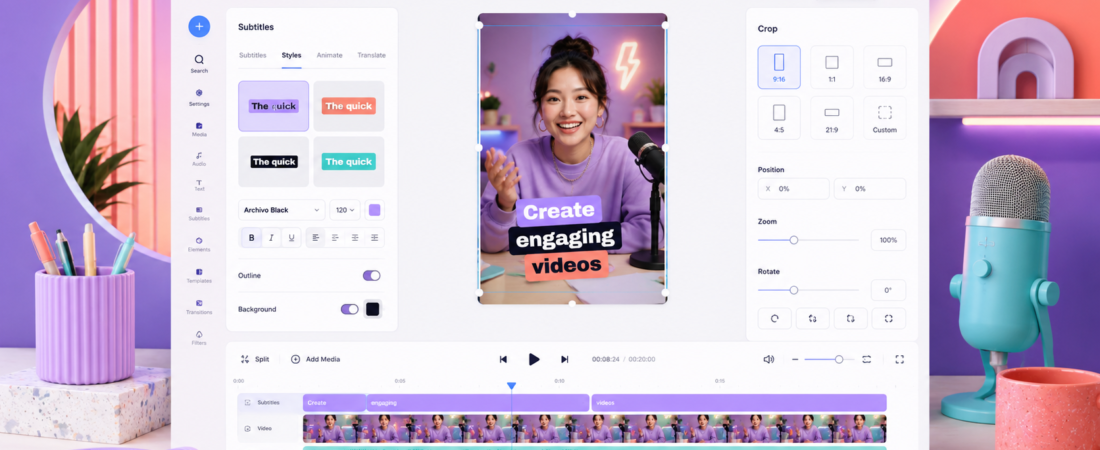
VEED is an online video editor built around jobs that happen repeatedly in content teams: add captions, remove pauses, place branded elements, crop a landscape recording into vertical video, translate or dub it, and export versions for different channels. It also markets AI generation, avatars, voice tools, screen recording, and collaboration.
That breadth is attractive, but it can make the product look like a replacement for every editor. It is not. VEED’s strength is reducing friction around common publishing tasks, not giving a patient editor unlimited control over complex compositing, audio routing, or a feature-length timeline.
If your main job is finding highlights automatically rather than shaping the whole video, my OpusClip review covers a more specialised route. For a text-first editor built around transcripts and podcasts, see my Descript review. VEED sits between them: more general than OpusClip, more conventionally visual than Descript.
The five-checkpoint friction test
Import: almost no setup tax
Because VEED runs in the browser, I can start without installing a large desktop application or building a proxy workflow. Uploading a short talking-head clip is straightforward, and the interface makes its next actions obvious. That makes VEED easy to hand to a colleague who is not a professional editor.
The caveat is the browser itself. Large files, long timelines, a weak connection, or limited memory can turn convenience into hesitation. For important projects, I keep original files locally and avoid treating the browser project as my only copy.
First cut: quick, but not surgical
Basic trimming, splitting, layouts, text, stock assets, audio, and simple transitions are approachable. The editor is much faster to learn than a professional desktop NLE. For a webinar clip, product update, course promo, or founder video, that simplicity is a feature.
It becomes a limitation when I want dozens of precisely layered edits, advanced colour work, or detailed sound design. VEED can make a polished social asset; it does not make me forget Premiere Pro or DaVinci Resolve exists.
Captions: the reason many people should try it
Automatic subtitles are integrated into the same project, and styling them for vertical video is much less tedious than rebuilding captions manually. I still proof every proper noun, number, and sentence boundary. No caption generator earns blind trust, especially with accented speech or noisy audio.
If captions are only part of a transcript-led editing job, compare the workflow with editing a podcast in Descript. Descript is stronger when words are the edit; VEED feels quicker when visual layout is the edit.
Repurposing: where VEED earns its place
Changing aspect ratios, reframing a speaker, adding progress bars or caption styles, and preparing platform-specific exports are exactly the chores a browser editor should simplify. If I already know the moment I want, VEED is a comfortable place to turn it into a publishable Reel, Short, or TikTok.
If I do not know which moment to use, I would start with a clipping tool. My guide to turning a YouTube video into Shorts explains that pipeline, and my beginner AI clip-generator comparison helps choose the front end.
Export: this is where the plan matters
VEED’s free exports carry a watermark. Paid plans remove it and unlock higher output quality and more AI usage, with exact allowances depending on the plan. The official editor page showed paid access starting at $9 per month when billed yearly, or $19 month to month, when I checked on August 20, 2026.
I would not buy from the starting price alone. Check the current export resolution, storage, subtitle, translation, and AI-credit allowances against your normal month. VEED has changed plan naming and packaging over time, which is why old third-party pricing tables can be misleading.
Is VEED free?
Yes, but the free plan is best for learning the interface and testing a real clip. The watermark prevents it from being my long-term choice for client work or a branded channel. Free tools are useful when the output is usable; a visible platform mark changes the character of the deliverable.
My recommendation is to make one complete 60–90 second vertical video before upgrading. Upload typical footage, auto-caption it, correct the transcript, add your brand treatment, and export. That single test reveals more than a feature grid: editing speed, caption cleanup time, browser stability, and whether the final compression looks acceptable.
VEED pricing: calculate the workflow, not the badge
VEED’s official product page advertises plans from $9 per month on annual billing or $19 paid monthly. Higher plans increase output and AI capacity, but the exact plan names and entitlements are the first thing I would verify at checkout. AI features can also consume credits separately from ordinary editing.
| If this describes you… | My buying advice |
|---|---|
| You need one watermarked test export | Use Free and learn the editor |
| You publish branded social clips every week | A paid plan can be easy to justify |
| You mainly need automatic highlight selection | Compare OpusClip or Vizard first |
| You edit long podcasts by transcript | Compare Descript before subscribing |
| You produce long, complex YouTube videos | Use a desktop NLE or test performance carefully |
For another example of why minutes and credits matter more than a sticker price, see my breakdown of Vizard AI pricing. And if you are comparing “free” creator plans generally, my guide to Descript’s free limits shows the same principle from a transcript editor.
The parts I genuinely like
What works
- A beginner can reach a respectable result quickly.
- Captions, resizing, branding, and editing live together.
- No desktop install makes collaboration and handoff easier.
- It is broad enough for everyday marketing requests.
- The vertical-video workflow feels native rather than bolted on.
What gives me pause
- The free watermark limits practical publishing.
- AI credits and changing plan allowances need careful checking.
- Browser performance is less reassuring for large projects.
- Power users will miss deeper timeline, audio, and colour controls.
- A wide feature set can encourage paying for tools you barely use.
VEED vs the alternatives I would actually consider
VEED vs Vizard
Choose VEED when you already know what you want to edit and want a flexible canvas. Choose Vizard when the first problem is turning a long recording into candidate clips automatically. My Vizard AI review covers its clipping workflow, and Vizard AI vs Descript maps the distinction between automatic short-form extraction and deeper transcript editing.
VEED vs Descript
VEED feels more natural for visual social assets; Descript feels more natural for podcasts, interviews, and edits that begin with the transcript. Descript’s Studio Sound is also a more central reason to choose it when spoken-audio cleanup is the bottleneck.
VEED vs OpusClip
VEED is the more complete editor. OpusClip is the faster sorting machine for long-form video. If you need bulk candidates, let the specialist find them and finish only the winners. My OpusClip vs Descript comparison explains the same automation-versus-control trade-off from another angle.
Who should use VEED?
- Solo marketers and founders creating product videos, updates, ads, and social posts without an editor on staff.
- Social teams that care more about fast branded variations than cinematic control.
- Educators and coaches making captioned lessons or promos from simple footage.
- Beginners who find desktop editors intimidating and want a short learning curve.
I would hesitate if you routinely edit multi-camera long-form video, demand fine colour and audio control, or work with unreliable internet. For recorded interviews and podcasts, a recording-first tool may be a better foundation; my Riverside review covers that workflow. For turning the finished recording into an entire campaign, see how I turned one video into ten social posts.
Final verdict: worth it for the right size of job
VEED is worth paying for when you repeatedly make short, branded, caption-heavy videos and want one approachable browser workspace. Its value is not that every feature is best in class. The value is that a non-editor can move from raw clip to channel-ready asset without stitching together five tools.
I would not subscribe merely because the AI menu is long. I would subscribe after one real test proves that VEED removes enough captioning, resizing, and export friction to save time every week. For a creator posting frequently, that can be a very sensible purchase. For occasional edits or long complex productions, the free watermark and browser trade-offs make the decision less convincing.