
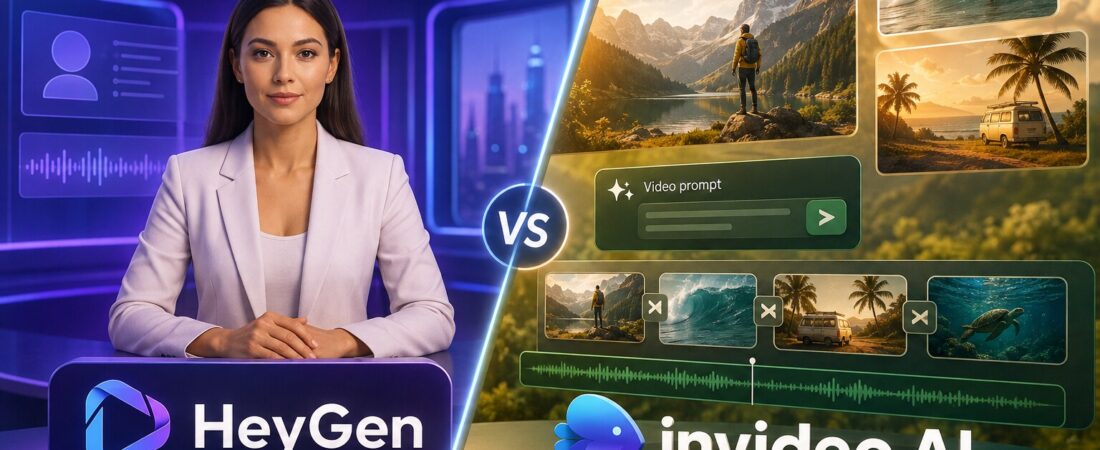
HeyGen and InVideo AI can both turn a prompt into a video, but that shared sentence hides the decision that matters. HeyGen is built to put a believable presenter on screen. InVideo AI is built to assemble a complete footage-led video from a prompt, with scenes, B-roll, narration, music and transitions.
I would choose HeyGen when the presenter is the product: training, sales outreach, localized announcements, explainers and avatar-led social video. I would choose InVideo AI when the story needs the screen: faceless YouTube, list videos, product montages, travel, marketing concepts and rapid visual drafts.
That is my verdict before the comparison table because it prevents a common buying mistake: paying for the tool that wins more feature rows instead of the tool that produces the format you actually publish.
HeyGen vs InVideo AI: quick comparison
| Question | HeyGen | InVideo AI |
|---|---|---|
| Best output | Avatar-led presenter video | Footage-led, faceless or cinematic video |
| Fastest starting point | Script + avatar + voice | Prompt + audience + duration |
| Human presence | Core strength: stock and custom Digital Twins | Available, but not the main reason to buy |
| Visual sourcing | Templates, assets and AI tools around the presenter | Generative video models, stock providers and automated scene assembly |
| Translation | Strong lip-synced avatar and video translation | Useful multilingual workflow, less presenter-centric |
| Entry paid plan | Creator $29 monthly | Plus $17/month equivalent, billed annually |
| Learning curve | Easier when the format is fixed | Easier for a first draft; harder to control scene choices |
I compared the tools through three actual briefs
Product update
A consistent presenter explains three new features in English and Spanish. The face, voice and lip sync must remain recognizable.
Faceless list video
A five-minute YouTube video needs a script, varied B-roll, music, captions and a coherent visual rhythm from one prompt.
Short product ad
HeyGen wins when a spokesperson builds trust. InVideo wins when the product, environment and movement should carry the story.
Test one: a multilingual presenter video
HeyGen is the cleaner choice. Its workflow begins with a stock avatar, Photo Avatar or Custom Digital Twin, then combines the presenter with an AI voice, script and scene design. On current plans, Avatar III consumes 3 credits per minute, while Avatar IV and V consume 20 credits per minute. Full lip-synced video translation uses 5 credits per minute.
This separation is useful. A creator can use the cheaper avatar engine for routine updates and reserve the more expensive model for hero content where facial realism matters. The Creator plan includes 600 credits, videos up to 30 minutes, 1080p export, voice cloning and 175+ languages and dialects. Pro raises the pool to 1,000 credits and adds 4K export plus access to advanced models.
InVideo AI now includes AI avatars and voice clones on paid plans, but I would not choose it specifically to create a digital spokesperson. The platform’s deeper advantage is access to many image, video, audio and music models plus stock media. If the same person must deliver fifty consistent updates, HeyGen’s product architecture is closer to the job.
For a full look at avatar realism, limitations and who should pay, read our HeyGen review.
Test two: a faceless YouTube video from one prompt
InVideo AI wins. Its Plus plan includes 75 credits per month, access to its AI workflows, multiple generative models, four AI avatars and voice clones, 20 GB of storage, 100 iStock assets and unlimited watermark-free exports. More expensive tiers mainly scale credits, concurrency, storage, avatars and stock allowances.
The important word is assembly. InVideo can take an idea, propose a script, choose a voice, source or generate visual scenes, add music and captions, then give you a complete first cut. HeyGen’s Video Agent can also create prompt-based projects at 20 credits per minute, but the platform still feels strongest when an avatar anchors the video.
Our InVideo AI review evaluates that prompt-to-publish gap in more detail. It is where the product either saves hours or creates a new review queue.
Test three: a 30-second product ad
This is the useful draw. A spokesperson ad benefits from HeyGen when trust, explanation and a consistent face matter. A product montage benefits from InVideo when the object, setting and pace should dominate.
I would use HeyGen for a founder-style message without requiring the founder to record every language. I would use InVideo for a travel bag shown across airports, trains and city streets. Both can produce the other format, but forcing the tool away from its centre usually means more correction.
Editing and control: neither replaces a deliberate editor
HeyGen gives you scene-level control, templates, media, voices and presenter settings. InVideo gives you prompt-based revision and a conventional way to replace scenes, footage, script and music. Both are powerful production systems; neither is my first choice for a dialogue-heavy rough cut that already exists.
If you recorded a real talking-head video, a transcript editor may be faster. Our Descript review explains why editing words can beat regenerating scenes. If you already have a finished long video and only need Shorts, an automatic clipper is a better category; see the OpusClip review or our OpusClip alternatives.
Pricing: the numbers are not directly comparable
HeyGen pricing
- Free: 3 videos per month, up to 1 minute each
- Creator: $29 monthly, 600 credits, 1080p and no watermark
- Pro: $49 monthly, 1,000 credits and 4K export
- Business: $149 monthly, 1,500 credits and team controls
InVideo AI pricing
- Plus: $17/month equivalent billed $200 yearly, 75 credits
- Max: $85/month equivalent billed yearly, 390 credits
- Generative: $170/month equivalent billed yearly, 800 credits
- Elite: $900/month equivalent billed yearly, 4,250 credits
The lower InVideo entry price is attractive, but credit units do not cross platforms. HeyGen’s current FAQ tells you that Avatar III costs 3 credits per minute and Avatar IV/V costs 20. InVideo’s cost varies by model and workflow, and the pricing page explicitly warns that model and agent prices can change. Compare the cost of one representative finished video, including discarded generations.
HeyGen monthly subscribers can roll unused credits for one additional month; annual credits accumulate until renewal. InVideo offers on-demand top-ups. Neither rule rescues an undisciplined production process.
Which is easier for beginners?
InVideo AI creates the more impressive first five minutes: describe a video and watch a full draft appear. The judgment burden arrives later when you decide which scenes feel generic, whether the facts are correct and where pacing needs intervention.
HeyGen asks for more format decisions at the beginning—avatar, voice, script, scene design—but becomes predictable once the presenter format is established. A team producing the same weekly update may find HeyGen easier over month three even if InVideo felt easier on day one.
Choose HeyGen
For avatar explainers, training, sales outreach, personalized video, localization and a recognizable virtual presenter.
Choose InVideo AI
For faceless YouTube, stock- or AI-footage stories, fast concept videos, B-roll-heavy marketing and prompt-led scene assembly.
Choose a conventional editor
When you already have good footage and the job is precise pacing, layered sound, color or complex motion.
Choose a clipper
When the long video is finished and the bottleneck is finding vertical moments. Our YouTube-to-Shorts guide covers that path.
My final verdict
HeyGen is better at making a person who was not filmed feel present. InVideo AI is better at making a video that was not edited feel assembled. That is the durable difference.
I would buy HeyGen for a repeatable presenter-led content system, especially multilingual training and product communication. I would buy InVideo AI for footage-led ideation and faster first cuts. I would not buy either because “AI video” sounds like one category. The output format should choose the tool.
Frequently asked questions
Is HeyGen better than InVideo AI?
HeyGen is better for realistic avatar-led and translated presenter videos. InVideo AI is better for generating footage-led or faceless videos with scenes, B-roll, music and narration from a prompt.
Which tool is better for YouTube?
Use HeyGen for a recurring virtual host or explainer. Use InVideo AI for faceless list videos, visual stories and prompt-generated B-roll. For recorded talking heads, a dedicated editor may be better than either.
Which is cheaper?
InVideo AI’s Plus plan has the lower annualized entry price. The credit systems measure different work, so compare the cost of your own representative finished video rather than plan credits alone.
Can InVideo AI create avatars?
Yes. Current paid plans include AI avatars and voice clones. HeyGen remains the more focused choice when avatar quality, consistency and lip-synced translation define the project.
Can HeyGen generate B-roll videos?
HeyGen offers prompt-based Video Agent projects and visual tools, but InVideo AI has the stronger centre of gravity for assembling footage, generative scenes and stock assets into a complete video.
Fact-checked August 22, 2026 against the official HeyGen and InVideo AI pricing pages. Credit costs, included models and promotions can change.