
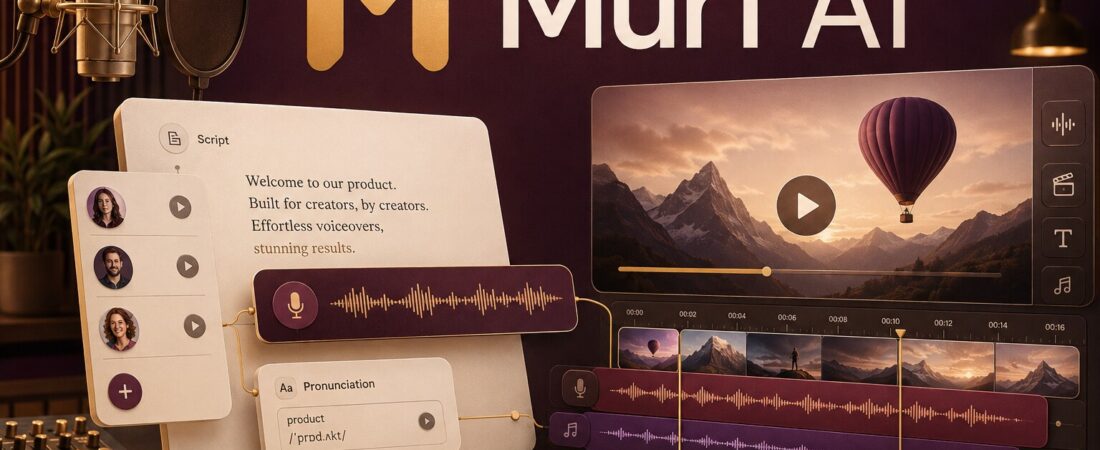
The most interesting thing about Murf AI is not whether its best voice can beat ElevenLabs in a blind test. It is how quickly a non-audio specialist can turn a script into a finished voiceover with visuals, music, pronunciation fixes and timing adjustments in one browser workspace.
That distinction shaped my opinion. Murf is a better studio than it is a pure voice-model purchase. The voices are clean, controlled and well suited to explainers, e-learning, presentations and business video. Creators chasing maximum emotion or low-cost voice cloning may prefer ElevenLabs. Teams that value a structured production surface may find Murf easier to live with.
What Murf AI actually is
Murf is a cloud voice platform with several products: Murf Studio for creating voiceovers and videos, AI Dubbing for localization, and Murf’s Falcon text-to-speech API for developers and conversational systems. This review focuses on Studio because that is the product most creators mean when they search for Murf AI.
Inside Studio, you paste or write a script, assign one of the available voices, adjust delivery and organize the result into blocks. You can place the narration against images or video, add music and control timing without exporting every small change into a separate editor. Murf currently advertises 200+ expressive voices across 35+ languages, custom pronunciation and control over pitch, speed and intonation.
Do not ask only, “Does this voice sound human?” Ask, “How many edits, exports and handoffs remain before the voiceover is ready for the video?”
My practical test: a three-minute product explainer
I judge Murf with a script that exposes the problems business voiceovers usually face: a product name, an acronym, a sentence with deliberate emphasis, one short list and a closing call to action. The goal is not theatrical acting. It is a consistent read that can sit under a screen recording without drawing attention to the software that made it.
First pass: fast and clean
Getting a usable first pass is straightforward. Paste the script, choose a voice and generate. Murf’s strongest business voices tend to sound composed and broadcast-ready. They handle an instructional tone better than exaggerated enthusiasm. This is an advantage for courses and internal training, where consistency matters more than performance fireworks.
Pronunciation: the feature that saves the revision
Brand names and specialist terms are where otherwise convincing AI narration breaks. Murf’s pronunciation tools let you specify how a word should sound and keep that correction available. I would build the pronunciation library before generating a long course module. Fixing the same acronym across twenty lessons is avoidable work.
Pacing: block-level control is more useful than one global slider
A good explainer needs room around headings and less space inside a tight sentence. Murf lets you work in manageable blocks and adjust pauses, speed and emphasis. The result still needs a full listen. Synthetic narration can be technically accurate while placing the emotional weight on the wrong word.
Voice quality: professional, not universally expressive
Murf’s top voices are credible for corporate narration, product demos, e-learning, podcasts and presentations. The delivery is often steady, intelligible and easy to control. That is not the same as saying every voice sounds human in every context. Long emotional passages, comedy, intimate storytelling and abrupt tone shifts remain harder tests.
ElevenLabs is still my preference when emotional range, character voices or creator-style narration is the priority. Murf makes more sense when the voice needs to operate inside a managed production workflow. Our Murf AI vs ElevenLabs comparison separates raw voice realism from studio usability, while the ElevenLabs review covers its wider creative toolkit.
The studio is Murf’s competitive advantage
A standalone text-to-speech generator gives you an audio file. Murf Studio gives you a project. That difference matters when the narration must line up with slides, screen recordings, product footage or chapter transitions.
The multimedia editor is not a replacement for Premiere Pro, DaVinci Resolve or a detailed podcast editor. It is a focused assembly surface. For an L&D specialist or marketer, that can be more useful than a deeper editor because the common task is aligning a clear voiceover with existing visuals, not color-grading a film.
If the recording is a real person rather than synthetic speech, I would use a different workflow. Descript Studio Sound is designed to repair spoken audio, and Descript is stronger for restructuring dialogue through a transcript. Murf is for generating the performance, not cleaning the microphone that captured it.
Where Murf fits best
| Use case | Fit | Why |
|---|---|---|
| E-learning and training | Excellent | Consistent narration, pronunciation control and slide/video alignment |
| Product explainers | Very good | Fast professional read and practical multimedia workflow |
| Presentations | Very good | PowerPoint and Canva integrations reduce handoffs |
| YouTube narration | Good | Clean delivery; emotional creator voices may be stronger elsewhere |
| Character storytelling | Mixed | Consistency is stronger than dramatic range |
| Cheap voice cloning | Weak fit | Confirm current plan access; ElevenLabs is easier to recommend for solo cloning |
Murf AI pricing and the free trial
Murf’s current public pages describe these starting prices when billed annually:
- Free trial: $0
- Creator: from $19 per month
- Business: from $66 per month
- Enterprise: custom
The free experience is specifically a trial. Murf’s help centre lists access to all 300+ voices across 33 languages, 10 minutes of voice generation, 10 minutes of transcription and project sharing—but no downloads. There is no credit card requirement.
I like this arrangement for judging the interface and voices. I dislike it as a “free plan” because a creator cannot complete the most important test: exporting the audio and placing it into a real production. Treat the trial as an audition. Use a representative paragraph with your brand names, numbers and preferred tone before paying.
Commercial rights and advanced features belong to paid plans. Check the live pricing and licensing terms for the exact tier, particularly if the output is client work, advertising or a monetized course. Pricing pages can also present annual rates more prominently than month-to-month billing.
For a detailed contrast with ElevenLabs’ current credit model, see our ElevenLabs pricing guide.
What I like
Strengths
- A coherent script-to-video voiceover workspace
- Strong fit for clear professional narration
- Useful pronunciation, speed, pitch and pause controls
- Large multilingual voice library
- Canva, PowerPoint and Captivate integrations
- Easy for non-audio specialists to understand
Limitations
- Free users cannot download the generated result
- Top voices can still sound controlled rather than emotionally spontaneous
- Annual starting prices can obscure the month-to-month cost
- Voice cloning access is less creator-friendly than some competitors
- The multimedia editor does not replace advanced video or audio finishing
- Long projects still need sentence-by-sentence review
Murf AI for podcasts and YouTube
For podcasts, Murf makes sense for scripted intros, narrative segments, multilingual editions and audio articles. It is not where I would edit a two-person interview. For that, a recording and editing stack such as Riverside plus Descript is more natural. Our AI podcast repurposing tools guide shows where recording, editing, clipping and written repurposing belong.
For YouTube, Murf is strongest when the script is locked and visuals already exist. A product tutorial, course lesson or faceless explainer fits. If you want an avatar presenter rather than voiceover, read the HeyGen review. If you want AI to invent and assemble the whole visual sequence, the InVideo AI review covers that more automated path.

Is Murf AI worth it?
My final recommendation
Yes for teams and creators producing structured voiceovers repeatedly. E-learning, product marketing, presentations and business explainers are the sweet spot.
No if your only goal is the most expressive voice or the cheapest cloning. Test ElevenLabs alongside it and judge the complete workflow, not one demo sentence.
Start with a real script. Use the free trial to test pronunciation, pacing and a difficult paragraph. Upgrade only if Murf reduces the time between approved script and finished asset.
Frequently asked questions
Is Murf AI free?
Murf provides a free trial with 10 minutes of voice generation and 10 minutes of transcription, but it does not include downloads. It is useful for testing, not publishing a finished project.
Can I use Murf AI commercially?
Commercial usage is associated with eligible paid plans. Check Murf’s current plan and license terms for the exact project before publishing client, advertising or monetized content.
Is Murf better than ElevenLabs?
Murf is often better as a structured business voiceover studio. ElevenLabs is my preference for emotional range, creative voice work and more accessible voice cloning. The right winner depends on the output.
Is Murf good for YouTube?
Yes, especially for scripted explainers, tutorials, educational videos and faceless narration. Creator-led storytelling may benefit from a more expressive model or a real recorded voice.
Does Murf support multiple languages?
Murf currently advertises 200+ expressive voices across 35+ languages, while its free-trial help page lists access to 300+ voices across 33 languages. Product counts can vary by page and plan, so verify the voice and locale you need inside the trial.
Fact-checked August 22, 2026 against Murf’s official pricing, product and help-centre pages. Voice counts, plan access and prices can change.