
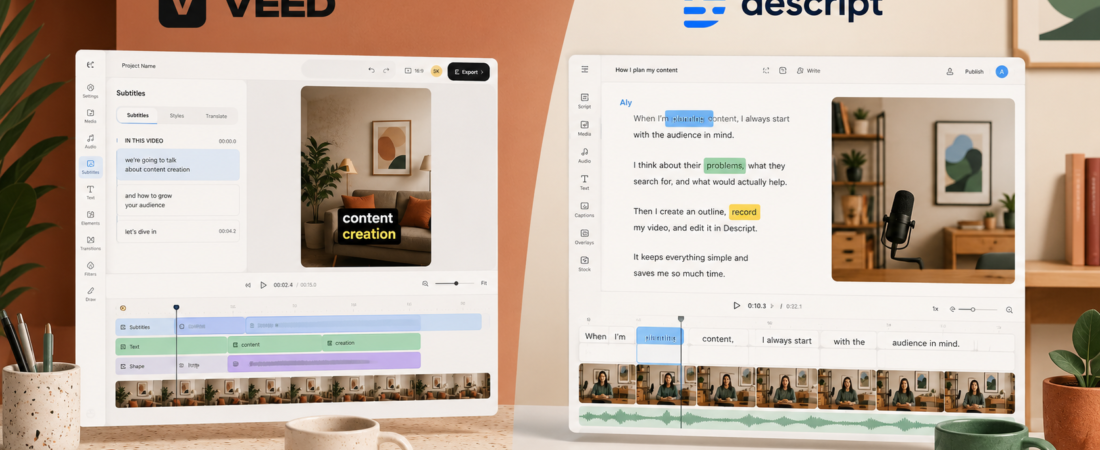
VEED and Descript can both turn raw footage into a polished video, but they ask you to think in different ways. VEED puts a canvas, layers, captions, and templates in front of you. Descript puts the transcript first and lets your words drive the edit.
That difference sounds cosmetic until you edit a real project. On a social promo, VEED feels immediate: resize the canvas, style the captions, move the logo, export. On a 40-minute interview, Descript’s document-like workflow can save an afternoon because deleting a sentence deletes the corresponding media.


Do you edit pictures, or do you edit ideas?
VEED behaves like the friendlier version of a conventional online editor. There is a stage in the middle, controls around it, and a timeline below. You can see where a subtitle sits, drag an element, apply a transition, browse stock assets, and build reusable branded layouts. If your mental model is “make this frame look right,” VEED meets you there.
Descript’s cleverness is that it treats speech as the organizing layer. Transcribe the video, edit the transcript, and the media follows. It is particularly good at the parts of editing that feel like rewriting: cutting tangents, tightening pauses, removing filler words, finding a quote, or rearranging an explanation. That is why I rated it highly in my full Descript review.
Neither philosophy is objectively better. The right one depends on where the work is hiding. A video with weak pacing but simple visuals is a Descript problem. A video with approved copy but lots of caption styling, overlays, and aspect-ratio versions is a VEED problem.
VEED feels natural when…
- The frame and brand treatment matter most
- You are making ads, promos, Reels, or explainers
- You want templates and stock media nearby
- Several deliverables share one visual system
Descript feels natural when…
- The story lives in spoken words
- You edit interviews, podcasts, or tutorials
- You need fast structural cuts
- Audio cleanup is part of every project
I compared them on four real creator jobs
Feature matrices often make editors look interchangeable. I get a clearer answer by asking what happens between import and export on jobs people actually do.
For a standalone Reel or TikTok with styled captions, a progress bar, a logo, and a call to action, VEED is faster to make attractive. The canvas is direct, vertical formats are obvious, and templates shorten the blank-page phase.
Descript can create and edit clips, but its strongest advantage appears when it has a longer spoken source to mine. If automatic clip discovery is the actual job, I would also compare both with OpusClip or Vizard AI. Our OpusClip vs Vizard comparison explains the specialist route.
I want to remove repeated thoughts, shorten pauses, fix the order, and clean the voice before I decorate the frame. Descript makes those editorial decisions unusually fast. Studio Sound can also rescue a roomier recording—within reason, as I found in my Studio Sound test.
VEED becomes the better choice when the cut is already locked and the video depends on frequent graphics, animated headings, product images, or tightly controlled caption design.
Transcripts are not a side feature in podcast editing; they are the map. Descript makes it easy to scan an hour of conversation, locate the section where the guest finally lands the point, and remove the detour before it. Multicam and visual polish still need attention, but the editorial core is strong.
If you are starting before the edit, capture quality matters more than either editor. See my Descript vs Riverside comparison and Riverside review. Riverside records remote guests; Descript is where I would shape the conversation afterward.
A repeatable brand kit, saved layouts, stock assets, and predictable visual positions matter more every week. VEED is better aligned with that production rhythm. A marketer can duplicate a proven project, replace the footage and copy, and stay within the visual rails.
Descript has brand and layout tools, especially at higher tiers, but it still feels happiest when the editor is solving the spoken story first.
Subtitles: VEED wins style, Descript wins surgery
Both products can generate captions. In VEED, subtitles are part of the visual design system: style, position, animate, resize, and adapt them for a platform. That is the better environment when captions are supposed to carry the social video.
Descript uses the transcript for more than display. It is the editing surface, a search tool, and a source for captions. I prefer it when accuracy corrections and content changes are happening together. I prefer VEED after the wording is stable and I care about exactly how the captions behave on screen.
If your plan is to create many shorts from one YouTube upload, start with our YouTube-to-Shorts workflow. It makes the important distinction between finding clips, editing clips, and packaging them—three jobs that software marketing tends to blur.
Audio and podcast editing: Descript is the clear choice
VEED includes audio tools, transcription, noise cleanup, voiceovers, dubbing, and music. That is enough for many marketing videos. Descript goes deeper into a speech-centered workflow: remove filler words, tighten gaps, edit from text, improve the recording, and work from a conversation rather than a sequence of visual layers.
For a practical walkthrough, my guide to editing a podcast in Descript shows why the transcript changes the job. If you also need show notes, newsletters, and social copy, an editor is only half the stack; Castmagic vs Descript separates content repurposing from media editing.
My rule: clean and restructure the conversation in Descript; make the promotional cut visually loud in VEED. Using two tools is not elegant, but sometimes it is faster than forcing one interface to do both jobs.
AI features: useful, but the editors still have identities
VEED now wraps editing, generation, talking heads, subtitles, dubbing, translation, and other AI features into a browser platform. Descript has Underlord, its AI co-editor, plus tools such as Create Clips, Studio Sound, filler-word removal, generative video options, and transcript-based editing.
I do not choose between them by counting AI buttons because those lists change quickly. I choose by asking where I want AI to intervene. VEED is oriented toward producing a finished visual asset. Descript is oriented toward understanding and transforming recorded speech. The overlap is growing, but the center of gravity still matters.
Learning curve and performance
VEED wins the first ten minutes. Anyone who has used Canva or a simple timeline editor can usually place a clip, change text, and understand the canvas. The browser-only workflow also avoids an installation step.
Descript wins after the transcript idea clicks. At first, it can feel odd that editing text changes the media. You also need to learn the difference between a composition, scenes, layers, and the underlying transcript. Once that model becomes familiar, speech-heavy edits can feel far faster than dragging cut points.
Both browser and cloud-assisted editors depend on upload speed, processing, and project complexity. I would not move a mission-critical weekly show into either one without completing a full episode—including export—during the trial. A smooth demo on a 30-second clip does not prove how a 60-minute multicam recording will behave.
VEED vs Descript pricing
Pricing changes often enough that I treat this as a snapshot, checked August 19, 2026. VEED says paid plans start at $9 per month billed yearly or $19 monthly. The free editor adds a watermark; paid plans remove it and unlock higher-resolution exports, from 1080p up to 4K depending on plan.
Descript currently lists Free at $0; Hobbyist at $16 per person per month on annual billing ($24 monthly), with 10 media hours, 400 AI credits, and 1080p watermark-free export; Creator at $24 annually billed ($35 monthly), with 30 media hours, 800 AI credits, and 4K export; and Business at $50 annually billed ($65 monthly), with 40 media hours and 1,500 AI credits.
| Question | VEED | Descript |
|---|---|---|
| Can I test free? | Yes, but free exports are watermarked | Yes; limited media and AI allowance |
| Lowest advertised paid entry | From $9/month annual or $19 monthly | Hobbyist $16 annual or $24 monthly |
| Usage model to watch | Plan-specific AI and export limits | Media hours plus AI credits |
| Best value for | Fast visual/social production | Speech-heavy editing and audio cleanup |
Do not compare only the first paid number. The real question is which tier contains the feature you use every week. With Descript, media hours, AI credits, and export quality are the pressure points; my Is Descript free? guide explains the free-plan ceiling. With VEED, test the watermark, export resolution, subtitle allowance, brand tools, and the specific AI feature before buying annually.
Which one should you choose?
Choose VEED if your deliverable is usually short, visual, branded, and platform-specific. It is the better fit for marketers, social teams, simple product videos, subtitle-led clips, and creators who want a friendlier canvas.
Choose Descript if your raw material is a conversation, tutorial, podcast, screen recording, or talking-head video. It rewards editors who think in sentences and story structure. It is also the tool I would rather use when poor room sound and verbal clutter are routine problems.
Choose neither as your only tool if automatic high-volume clipping is the main requirement. Compare specialist options in our AI clip generator guide and OpusClip vs Descript comparison. A full editor and an automatic clip finder solve adjacent, not identical, problems.
My final pick
For a podcast or a weekly YouTube talking-head show, I would pay for Descript first. For a social marketing calendar with templates, captions, graphics, and many aspect ratios, I would pick VEED. If you are still unsure, edit the same three-minute talking-head clip in both free plans. The editor that makes your most annoying step disappear is the right one—not the platform with the longer feature page.
Once the long-form edit is finished, use the system in How I Turned One 20-Minute Video Into 10 Social Media Posts to decide what should become a clip, post, newsletter, or article. The editor matters; the distribution plan is what turns one finished video into leverage.
Prices and feature limits were checked against official VEED and Descript pages on August 19, 2026. Verify the live checkout before purchasing because plan names, allowances, and promotional pricing can change.